Handover
The design's files for the client, the utility and the installer, what each one holds and how it is made, and the project file that carries the design.
Handover is the last of the five steps in SolarLayout Rooftop: the files for the client, the installer and the utility. Reach it by the Handover step, or by Continue to Handover at the head of Performance. Each file is made by the server from the design as it is at that moment, for the option the run shows: the one you chose, else the run's first.
The files
The files stand in four groups, by who they are for:
| Group | File | Format | What it is |
|---|---|---|---|
| For the client | Design report | The design on A4 landscape pages: summary, layout, shadows, energy, schedule, single-line diagram | |
| For the utility | Single-line diagram | PNG | Strings, MPPTs, inverter and the AC side to the grid |
| For the installer | Bill of materials | CSV | The items to buy, with their quantities |
| For the installer | Cable schedule | CSV | Each string's DC cable: length, size and voltage drop |
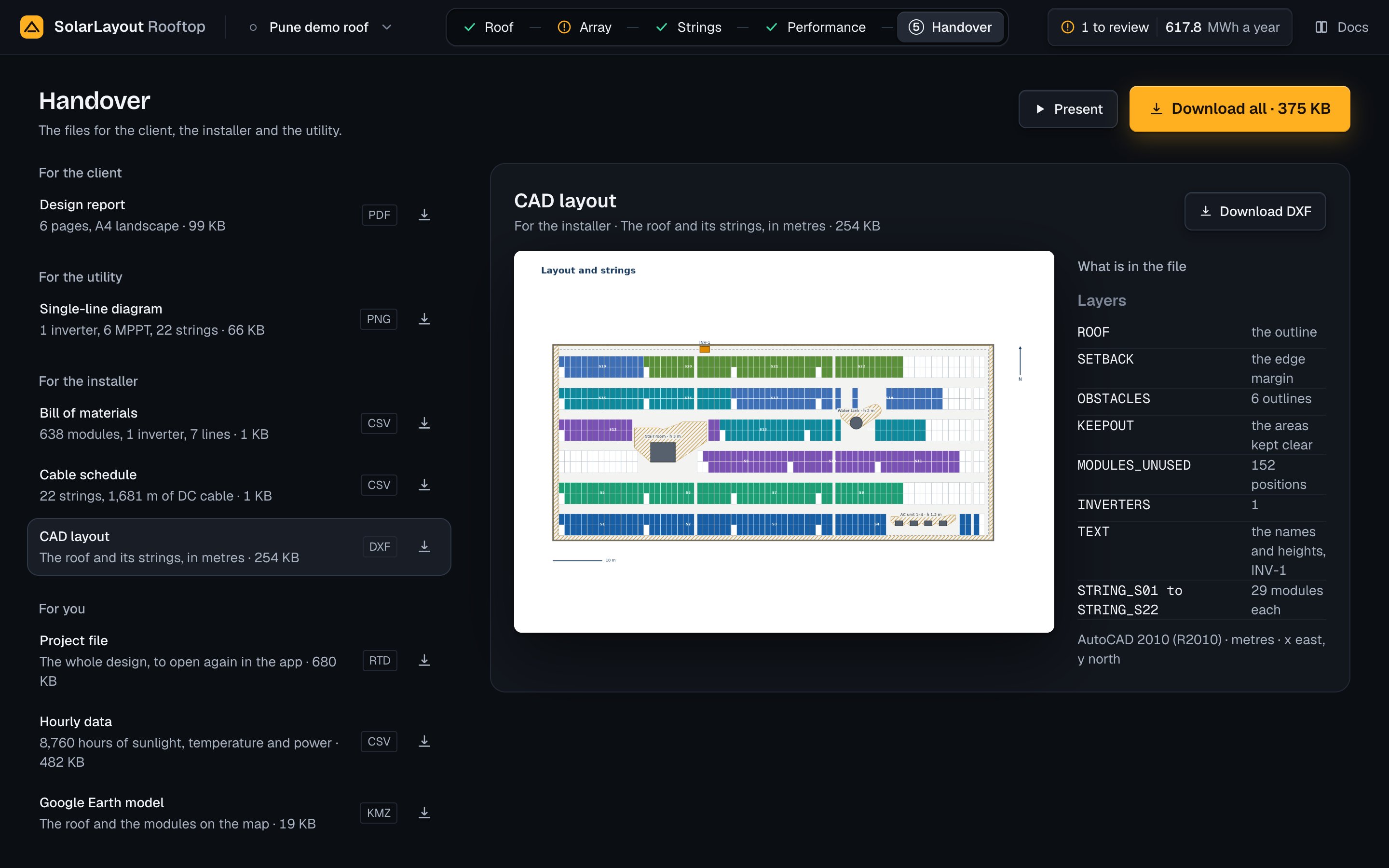
| For the installer | CAD layout | DXF | The roof and its strings, in metres, on layers |
| For you | Project file | RTD | The whole design, to open again in the app |
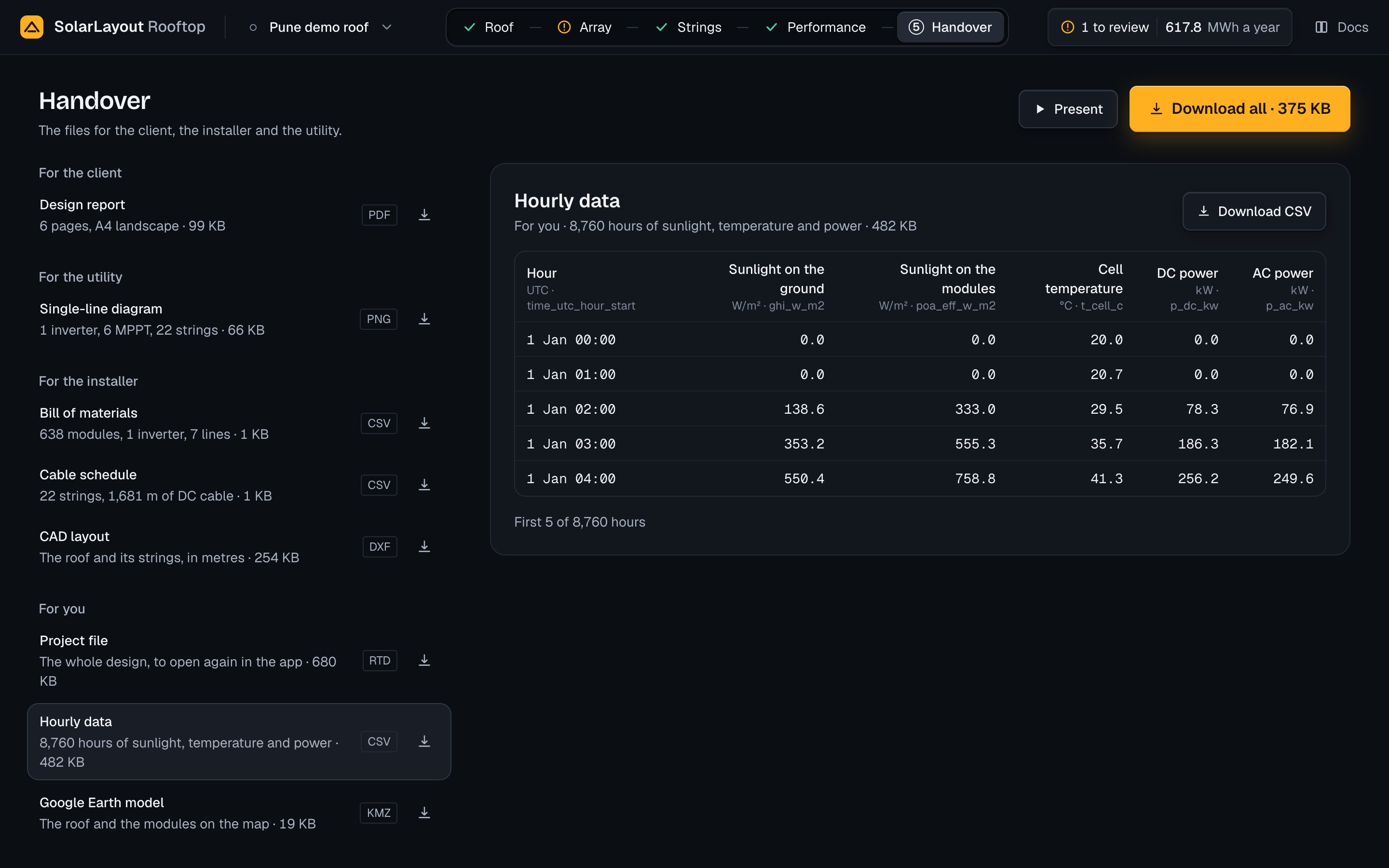
| For you | Hourly data | CSV | Each hour's sunlight, temperature and power |
| For you | Google Earth model | KMZ | The roof and the modules on the map |
Each row gives the file's name, a line about it with its size once the size is known, its format and its own download button. Press the row to open the file's preview; press the download button beside it to save the file without opening it. The lines:
| File | Its line |
|---|---|
| Design report | "<n> pages, A4 landscape" |
| Single-line diagram | The inverters, the MPPTs and the strings, e.g. "1 inverter, 6 MPPT, 24 strings" |
| Bill of materials | The modules, the inverters and the lines of the file |
| Cable schedule | The strings and the metres of DC cable |
| CAD layout | "The roof and its strings, in metres" |
| Project file | "The whole design, to open again in the app" |
| Hourly data | "<h> hours of sunlight, temperature and power", one an hour of the design's weather |
| Google Earth model | "The roof and the modules on the map" |
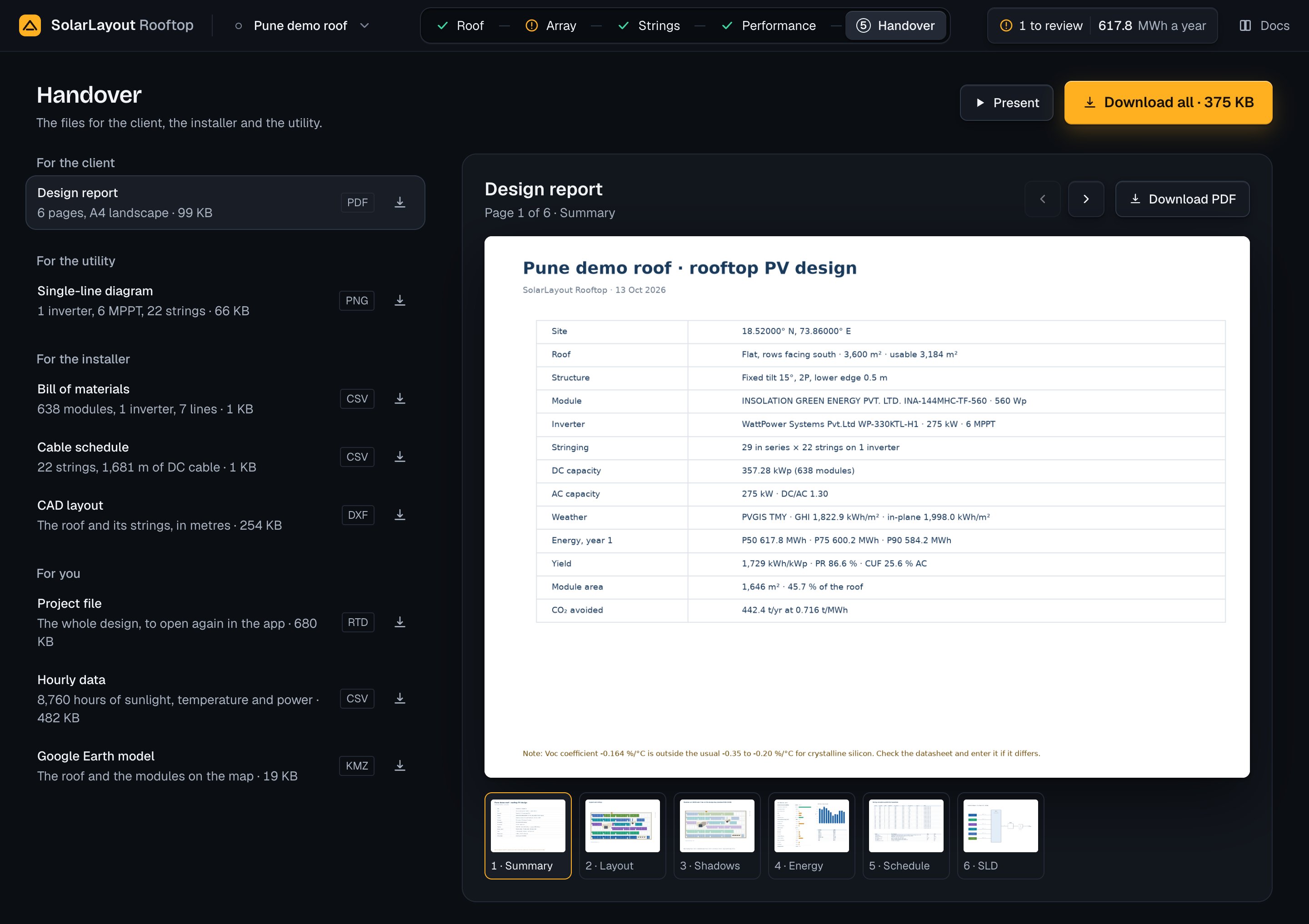
On a desktop the list stands at the left and the open file's preview fills the rest of the page; Handover opens on the Design report. The preview's head gives the file's name, who it is for with its line, and the file's own Download PDF, Download PNG, Download CSV, Download DXF, Download RTD or Download KMZ.
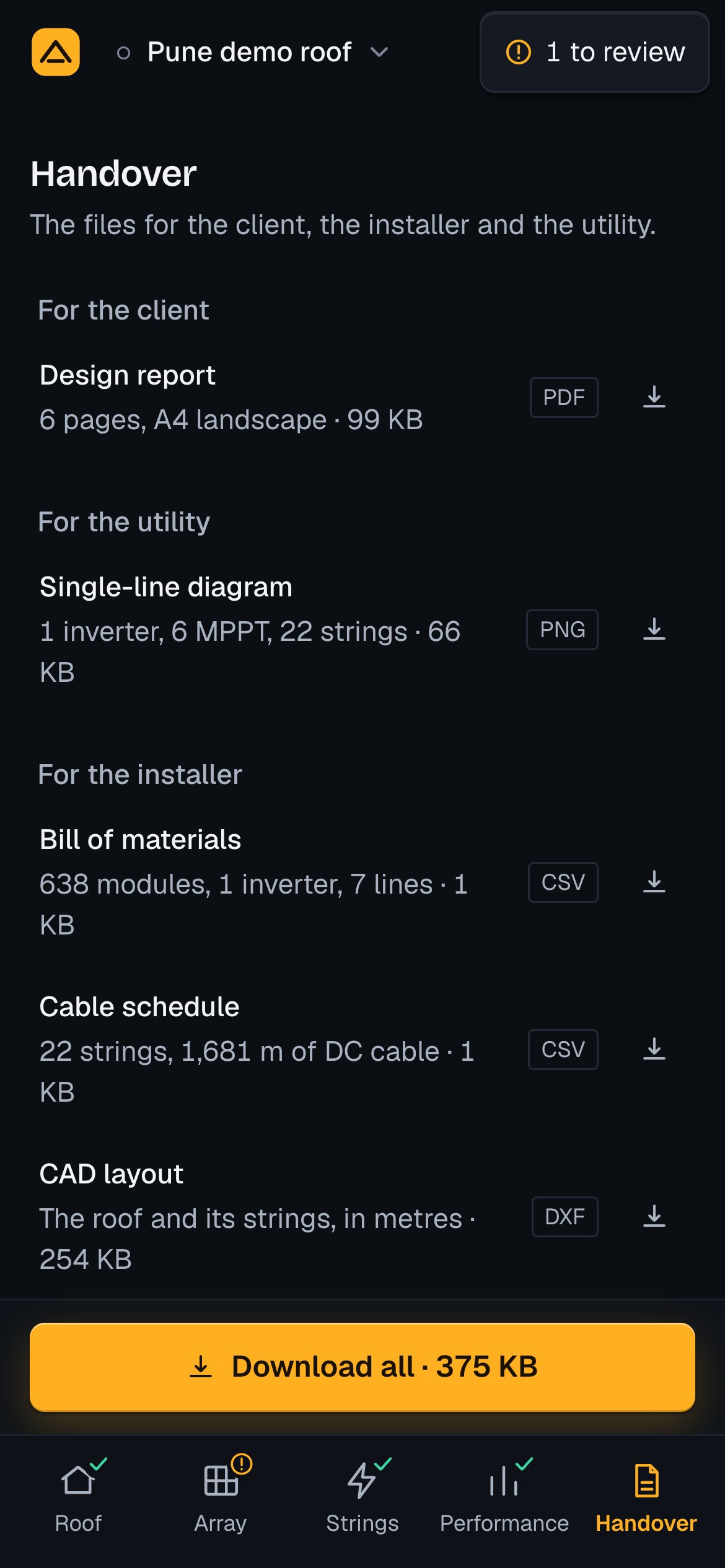
On a tablet or a phone the list is the screen. A file opens over it with a back row, Handover, at its top; on a phone the preview's button reads Download.
How a download works
A press asks the server for the file, made from the design as it is and dated with this device's day, and the browser saves it under the name the server gives. Nothing on the page says it worked: the browser shows its download. While a file is on its way a turning ring stands in its button, a second press does nothing, and the browser asks before you leave the page. A file is kept for that edit of the design, so its preview and its two download buttons give the same bytes; any edit asks for it again.
The file's name is the design's name with each run of spaces and of the characters \ / : * ? " < > | turned into one hyphen, at most 80 characters, then an ending. With an empty result the name is rooftop-design. For the demo, "Pune demo roof", the names are:
| File | Name |
|---|---|
| Design report | Pune-demo-roof-report.pdf |
| Single-line diagram | Pune-demo-roof-single-line-diagram.png |
| Bill of materials | Pune-demo-roof-bill-of-materials.csv |
| Cable schedule | Pune-demo-roof-cable-schedule.csv |
| CAD layout | Pune-demo-roof-layout.dxf |
| Project file | Pune-demo-roof.rtd |
| Hourly data | Pune-demo-roof-hourly.csv |
| Google Earth model | Pune-demo-roof.kmz |
| Download all | Pune-demo-roof.zip |
Download all
Download all saves one zip of the seven files of the option and the project file, each under its own name, compressed. It is Handover's primary: at the head's right on a desktop, with Present before it; on a tablet, pinned at the foot of the list with Present before it; on a phone, pinned across the foot over the tab bar. Once the zip's size is known, the button shows it after its name.
It can be used when there is a chosen option, the run did not fail and at least one file besides the project file is ready. While the zip is on its way a turning ring replaces its icon. If it fails, a toast gives the reason with Try again.
Design report
A PDF in A4 landscape, one page a figure, for the client. Its pages, in order:
| Page | Title | What it holds |
|---|---|---|
| 1 | Summary | The design's name and "rooftop PV design", the date on this device, and a table of the site, roof, structure, module, inverter, stringing, DC and AC capacity, weather, energy of year 1, yield, module area and CO₂ avoided. A note from the module file stands at its foot when there is one |
| 2 | Layout and strings | The plan with the strings. The demo's page carries the string labels, the obstacles with their heights, the inverter, a north mark and a scale |
| 3 | Shadows | The plan in shadow at the end of the shade-free hours on the design day, with the near shading, string shading and horizon shading losses and the area kept clear, m² |
| 4 | Energy | The loss diagram of year 1 (the 21 steps), the energy each month with the highest and lowest months' values, and a table of years 1, 5, 10, 15, 20 and 25, the 25-year total, and P50, P75 and P90 |
| 5 | String schedule and bill of materials | The first 28 strings of the cable schedule, then the bill of materials |
| Then | String schedule, continued | 40 strings a page, after the first 28 |
| Last | Single-line diagram | The diagram as its PNG draws it |
A design of 28 strings or fewer has 6 pages. The summary's roof row names the roof type as "Flat, rows facing south" (north south of the equator), "Flat, rows facing east and west" or "Sloped", with the roof's area and its usable area. The energy figures are those Performance shows.
The preview shows the pages as the PDF draws them, one in a paper frame and thumbnails under it. On a tablet and a desktop its head reads "Page <n> of <count> · <title>" with Previous page and Next page; on a phone these stand in a row under the paper. ← and → on the focused paper or thumbnails turn the page. The pages are asked for once an edit, as soon as the run has an option.
Single-line diagram
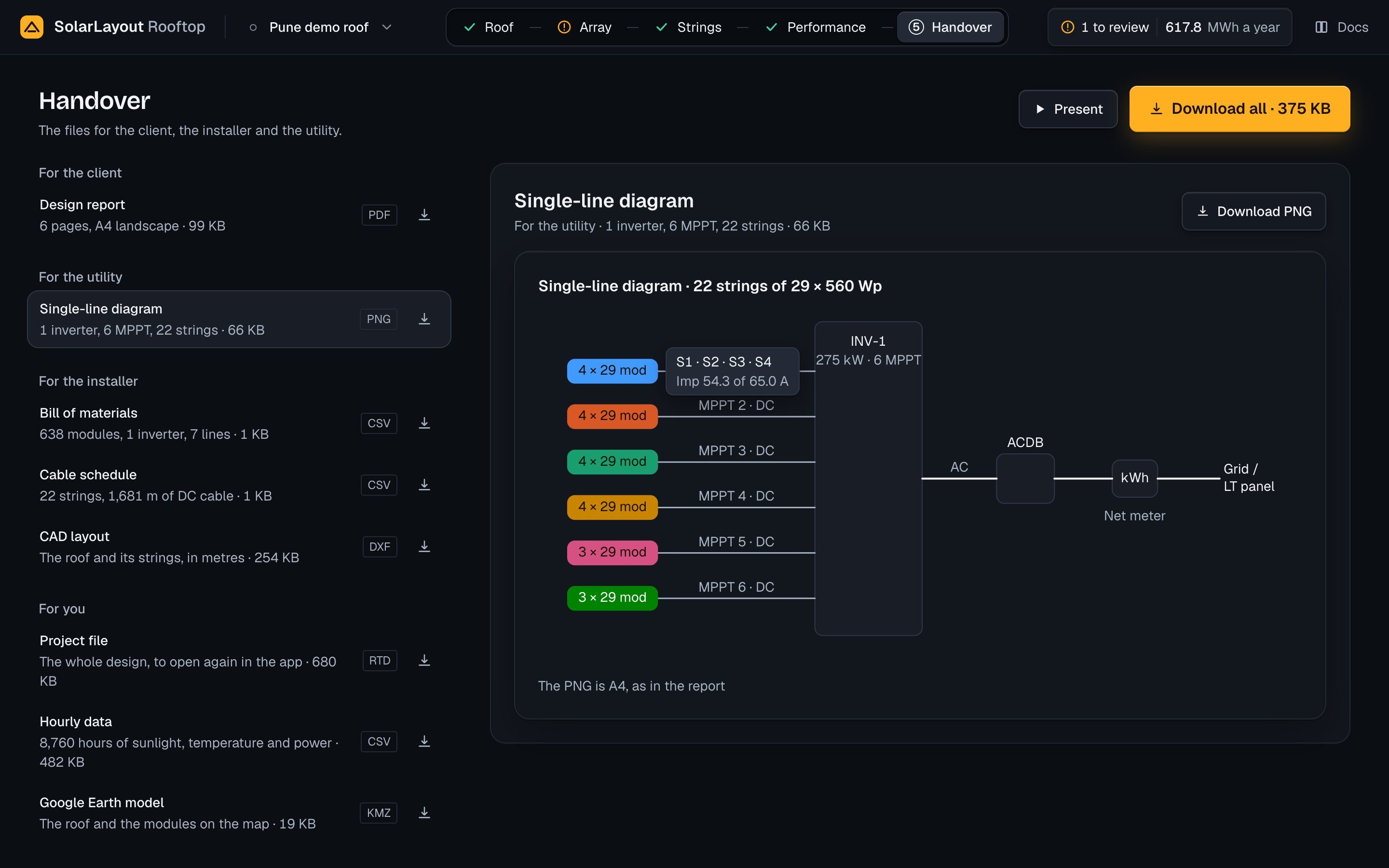
A PNG at A4 landscape, 200 dpi (2338 × 1654 px), for the utility: the strings, each MPPT, each inverter, the AC distribution board (ACDB), the net meter and the grid.
| Part | What it shows |
|---|---|
| Title | The strings, the modules in each and the module's power |
| Inverter | A box "INV-<i>" with its kW and its MPPT count |
| MPPT | A block of its strings × modules on a line "MPPT <j> · DC"; an MPPT with no string reads "MPPT <j> · not used" |
| AC side | A line "AC" to the "ACDB" box, the "Net meter" (kWh), then "Grid / LT panel" |
The preview is the same diagram drawn by the app, each MPPT block in its MPPT's colour as the Strings step colours the strings, captioned "The PNG is A4, as in the report". Point at a block, tap it or focus it for its strings ("S1 · S2 · S3 · S4") and its current against the MPPT's limit, "Imp <x> of <limit> A", or "Imp <x> A · limit not known". MPPT loading explains the limit.
Bill of materials
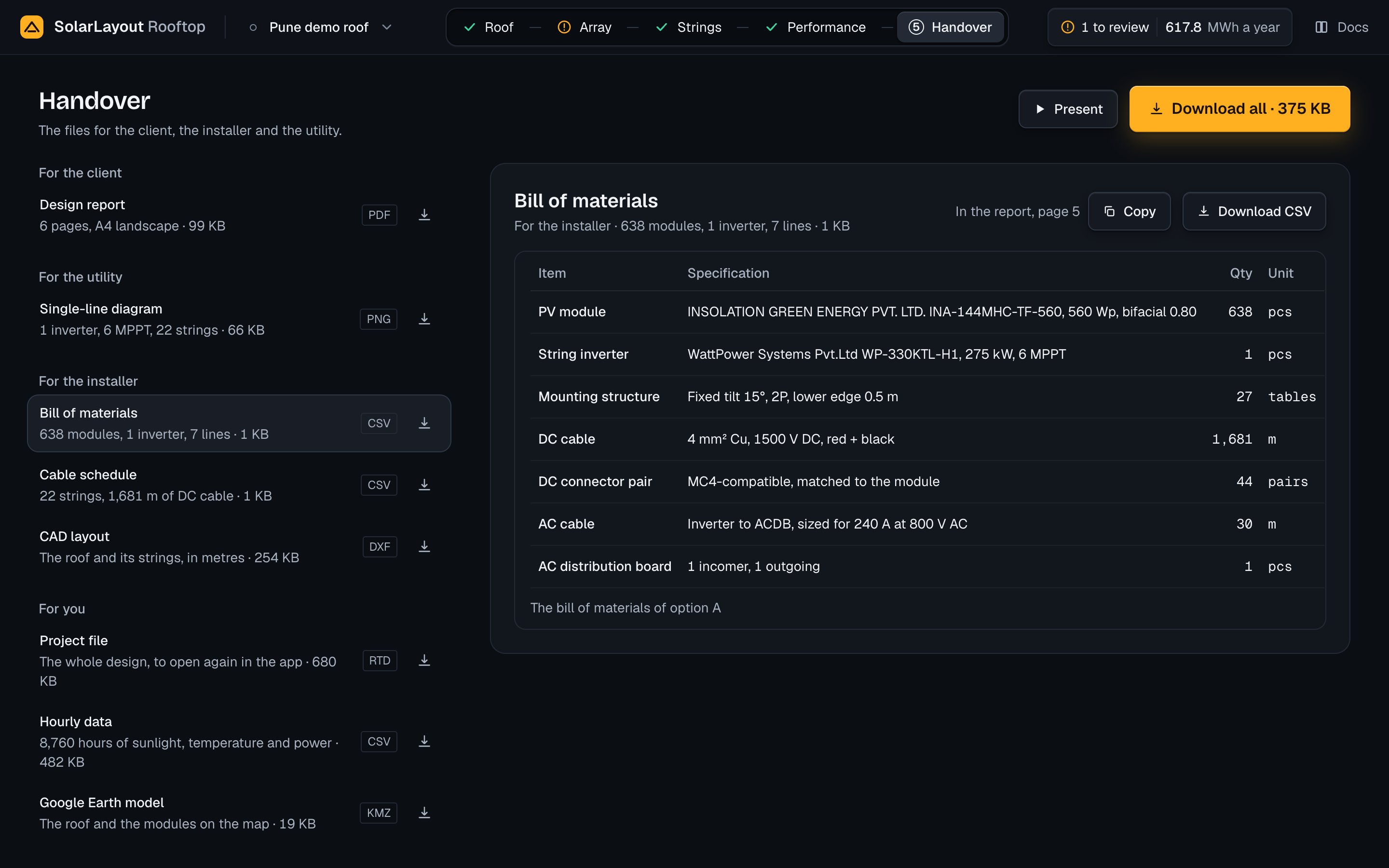
A CSV for the installer, with the head Item,Specification,Quantity,Unit, one line an item:
| Item | Specification | Quantity |
|---|---|---|
| PV module | Maker, model and Wp, with the bifaciality for a bifacial module | The modules the option uses (modules per string × strings), pcs |
| String inverter | Maker, model, kW and MPPT count | The option's inverters, pcs |
| Mounting structure | The mounting, as in the report's summary | Tables: on tilted rows and sloped roofs, each unbroken run of used modules along a row; on an east-west roof, each row that holds a used module |
| DC cable | "<4, 6 or 10> mm² Cu, <system voltage> V DC, red + black", one line a size, the smallest first | The lengths of that size's strings in the cable schedule, summed, in whole metres |
| DC connector pair | "MC4-compatible, matched to the module" | 2 a string, pairs |
| AC cable | "Inverter to ACDB, sized for <I> A at <V> V AC", I the inverter file's maximum AC current, else its power over √3 × V; 415 V where the inverter file (OND) gives no output voltage, which the line then says | The AC cable length of one inverter × the inverters, m |
| AC distribution board | Its incomers and 1 outgoing | 1, pcs |
The AC cable length is the design's: 30 m by default, from 1 to 2,000 m, set with the inverter. The report's page 5 and the CSV come from the same option and the same calculation.
The preview is a table of Item, Specification, Qty and Unit, captioned "The bill of materials of option <letter>", with "In the report, page 5" and Copy. Copy puts the table on the clipboard as tab-separated text, a header line and then one line a row, and says "Copied".
Cable schedule
A CSV of the DC string cables, for the installer: one row a string, in order of azimuth, then row, then the position of the string's first module.
| Column | What it holds |
|---|---|
String | "S<n>" |
Inverter | "INV-<n>" |
MPPT | The MPPT within its inverter, from 1 |
Modules | The modules per string |
Voc cold (V) | One module's Voc at the lowest ambient × the modules per string, 1 decimal |
Isc (A) | The module's Isc, 2 decimals |
DC cable (m) | The string's cable length, 1 decimal |
Drop (%) | The voltage drop over that length, 2 decimals |
Cable | "<size> mm² Cu, <system voltage> V DC" |
How a length is worked out
Each inverter stands at the point on the setback line nearest the mean of its strings' first-module centres. A string's length is 2 × (the east-west distance plus the north-south distance from its first module to its inverter, + 2 m of slack), for the + and − home runs. Where the layout is single-line (an east-west roof, or all modules in one line), the string's own extent, from its first module to its farthest, is added for the return leg. The length is rounded to 0.1 m.
How a size is chosen
For each string, the smallest of 4, 6 and 10 mm² copper that meets both:
- Current. It carries 1.25 × the module's Isc (IEC 60364-7-712) within the rating of EN 50618 cable, two loaded cables side by side on a surface at 60 °C ambient: 44, 57 and 79 A.
- Voltage drop. It drops no more than 1 % of the string's voltage at its maximum power point at STC over its length. The resistance is that of IEC 60228 class 5 tinned copper, 5.09, 3.39 and 1.95 Ω/km at 20 °C, raised to a conductor at 70 °C (× 1.1965). Imp and Vmp come from the module file, or its Isc and Voc where it gives none.
If no size holds the drop, the string takes 10 mm² with its drop, and the preview marks it: "Over 1 % even at 10 mm². Shorten the run or move the inverter nearer."
The drop is the cable's alone. The energy's DC ohmic loss is the percentage set on Performance, under All 21 steps.
The preview is a table of the nine columns, Voc cold in whole volts, with a last row of the strings and the sum of their lengths, captioned "The cable schedule of option <letter>, by string". Press a column's head to sort by it upwards, again for downwards, a third time for the file's order; the first eight columns sort, on a tablet and a desktop. "In the report, page 5" and Copy stand in its head, as for the bill of materials.
CAD layout
A DXF for the installer, AutoCAD 2010 (R2010), in metres, in the roof's local metres with x east and y north. Its layers:
| Layer | Colour | What it holds |
|---|---|---|
ROOF | 7 | The roof's outline |
SETBACK | 8 | The line inside the edge margin, where there is one |
OBSTACLES | 1 | Each obstacle's footprint |
KEEPOUT | 30 | The areas kept clear, within the roof |
MODULES_UNUSED | 9 | The positions the option does not use |
INVERTERS | 40 | A rectangle at each inverter |
TEXT | 7 | "<obstacle name> h=<height>" at each footprint's centre, and "INV-<n>" 0.2 m north of each inverter |
STRING_S01, STRING_S02 and on | 2 to 7 in turn | One layer a string, with its modules' outlines |
An inverter's rectangle takes the width and depth its inverter file (OND) gives; where it gives none, a 2 × 1.2 m block labelled "INV-<n> (symbol, not to scale)". The preview shows the report's layout page in a paper frame and What is in the file, which opens the list of layers, captioned "AutoCAD 2010 (R2010) · metres · x east, y north".
Google Earth model
A KMZ that holds one KML document, named after the design:
- A folder "Roof" with the roof's outline, "Roof", and one "<name> h=<height>" for each obstacle.
- A folder "Modules (<n>)" with one "Module <k>" for each position the option uses, k being the position's own number in the layout, so the numbers skip the unused positions.
The shapes are polygons in WGS84 longitude and latitude at altitude 0. The unused positions, the inverters, the wiring and the kept-clear areas are not in it. As the preview says: "Google Earth draws the shapes flat. Heights are in the names."
Hourly data
A CSV of the run's hours, one row for each hour of the design's weather (8,760 for a typical year), values to 3 decimals:
| Column | In the file | Unit | What it is |
|---|---|---|---|
| Hour | time_utc_hour_start | UTC | The hour's start, e.g. 2019-01-01 00:00:00+00:00 for the typical year |
| Sunlight on the ground | ghi_w_m2 | W/m² | The global horizontal irradiance |
| Sunlight on the modules | poa_eff_w_m2 | W/m² | The effective irradiance on the plane of the modules, the mean over the strings |
| Cell temperature | t_cell_c | °C | The mean over the strings |
| DC power | p_dc_kw | kW | At the inverters' inputs, after the DC losses |
| AC power | p_ac_kw | kW | To the grid, after the inverter, clipping, night consumption, AC ohmic loss and availability |
At night the AC power is negative by the inverter's night consumption. The preview shows the first 5 hours, each column under its plain name with "<unit> · <file name>", captioned "First 5 of <n> hours".
Project file
The project file (.rtd) is the whole design in one file, to open again in the app. Free, no account needed. Your designs are kept on this device. A design on one device is not on another: the project file carries it across. Download it here, then open it on the other device with Open a project file.
It holds the design's name and its place's name; the roof (its outline, place, roof type, edges, walkways, clearances, roof albedo, pitch and direction, how it was entered, and its obstacles); the array; the losses; the module file and the inverter file, each with its text; the weather source, a weather CSV with its text, and the weather itself; the system voltage and who set it; the sizing temperatures, the MPPT current limit and the Voc coefficient where set; the chosen option and your own option; and the AC cable length. It holds no results: no layout, no energy, no options, no files. The design runs again when it is opened.
The project file never waits: it can be downloaded with no option, no voltage and no run. Its preview has a Name field, the design's name: change it to rename the design (undo takes it back), at most 200 characters; empty, it says "A name is needed". The file's name follows as you type. Under it stand "Format version 2" and What is in it, with the module file, the inverter file ("The app's sample" when the design names none), the weather and the system voltage among its rows.
The project menu's Download the project file downloads it too, and so does the same item in a design's menu on Home. The page on your designs and the project file covers keeping and opening them.
When a file is not made
| You see | Why | What to do |
|---|---|---|
| Grey bars in place of the lines | The first run of the design is on its way | Wait for the run |
| Each line but the project file's reads a reason, such as "Choose a system voltage to size the strings", and the preview shows a card with Open Roof or Open Strings | No option can be made | Press the card's button; the project file can still be downloaded |
| "Files not made" with Try again and the reason; the rows read "Not made" | The first run failed | Press Try again |
| "Files not updated", "Showing the last result" and Try again | A later run failed; the files of before stay | Press Try again |
| "Pages not made" or "Pages not updated" with Try again | The report's pages did not come (report and CAD layout previews) | Press Try again |
| "Hourly data not made" with Try again | The hourly preview did not come | Press Try again |
| A toast with the reason and Try again | A download or Download all failed | Press Try again |
| "The table could not be copied. Select it and copy by hand." | The browser refused the clipboard | Select the table and copy it |
When the server's answer cannot be read, the app asks for a file again, up to three tries in all. More cases are on the troubleshooting page.
Performance
The energy the design sends to the grid, where it is lost, the weather it is computed from, 25 years of output and the model behind the figures.
Present
The open design as a tour on the whole screen, for a client, in six scenes from the place to the energy, with the controls and keys that run it.