Strings
The options for wiring the modules and the proof that each fits, your own option, the inverter, the system voltage, the MPPT loading and when no length fits.
The Strings step of SolarLayout Rooftop wires the modules to the inverter. A string is a run of modules wired one after another, in series; an MPPT is an input of the inverter that tracks a group of strings at their best working point. The run sizes the strings from the system voltage, the inverter, the module and the site's coldest and hottest hours, and offers up to five ways to wire them, the options, each simulated for a full year. You choose one.
The step's head says Check the strings and How the modules are wired to the inverter. Its sections, top
to bottom: Options, Inverter, System voltage, MPPT loading (with options only), Sizing
temperatures and Inverter limits and cabling. Each closed row gives its facts and who set it:
Default, From the weather, Set for <country> or Yours. The ? beside Options, Inverter,
System voltage and MPPT loading, and on the Modules per string bar, opens its help topic. The
step's primary is Continue to Performance.
On a desktop, the line under the stage's title sums up the chosen option, as 24 strings of 25 modules · 1 inverter, 6 MPPT · 190 positions not used on the demo. Opening the step from 3D turns the stage to Plan;
leaving it turns the stage back to 3D if the step turned it.
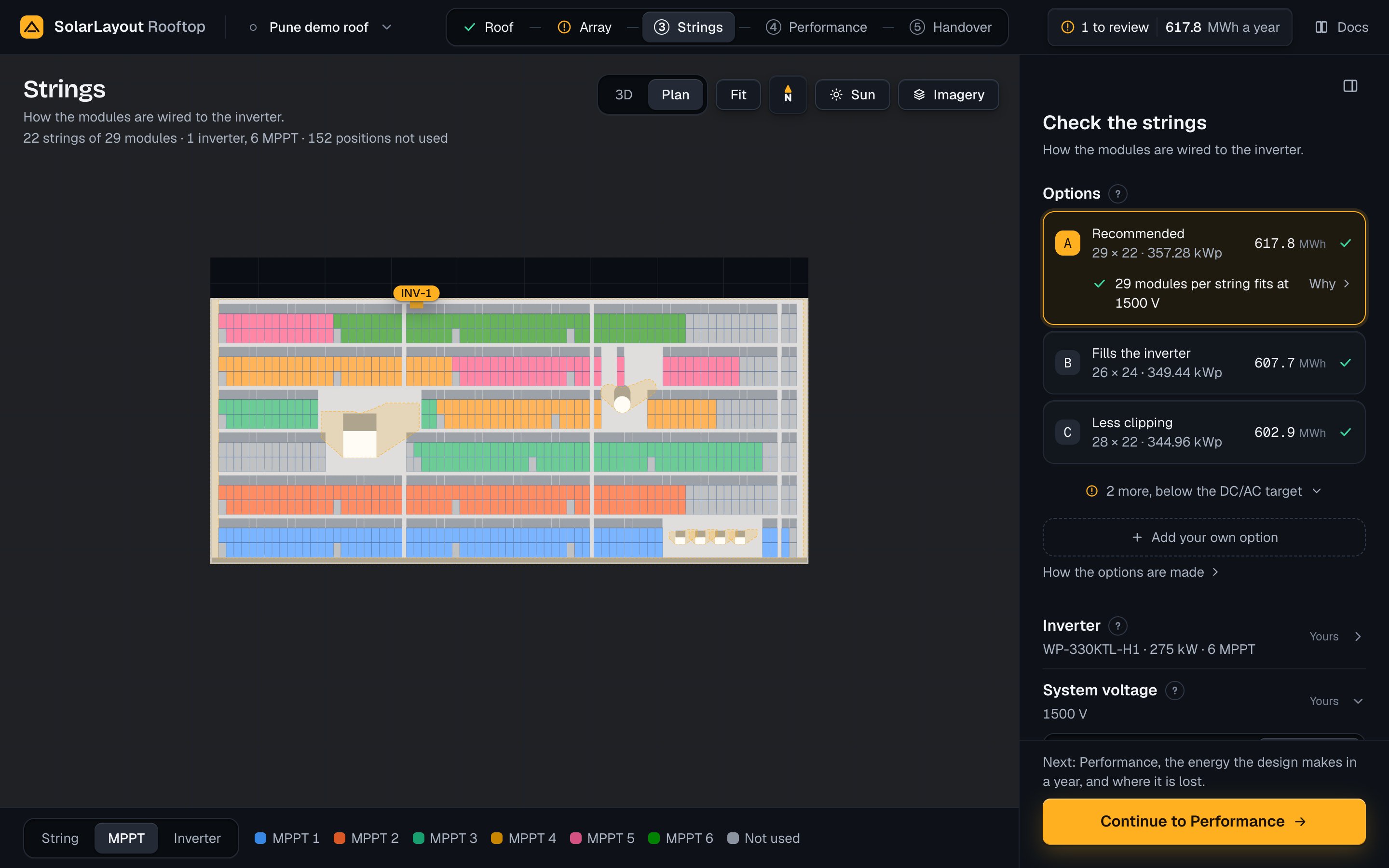
A change on this step runs the design again, half a second after the last edit: the system voltage, the inverter, the sizing temperatures, the current per MPPT, the cable and your own option. The layout stays as it is. Choosing an option runs nothing.
Options
Options holds the run's options as cards, the best first. A card gives:
- its letter, A to E (your own option takes the next letter);
- its caption, why it is there in two or three words;
- its modules per string × its strings and its DC capacity, as
25 × 24 · 348.00 kWp, with· 2 inverterswhen it takes more than one; - the energy of year 1, in MWh;
- its mark: a tick when it fits, an exclamation mark when it does not.
The DC/AC ratio is the modules' power over the inverters' AC power: strings × modules per string × the module's power ÷ (inverters × the inverter's AC power). Its target is 1.10 to 1.30. An option fits when its ratio is in the target and each MPPT's current limit is known and kept.
| Caption | What it means |
|---|---|
| Recommended | The first option, when its DC/AC ratio is in the target |
| Fills the inverter, Fills the inverters | In the target, and its strings fill its inverters: as many strings as the inverters take |
| Less clipping | In the target, and it clips less than the Recommended option |
| Below target | Its DC/AC ratio is under the target, below 1.10 |
| Above target | Its DC/AC ratio is over the target, from 1.30 to 1.40 |
| Heavy clipping | Its DC/AC ratio is over 1.40 |
| Your own option | The option you added |
Option <letter> | None of the above sets it apart |
Press a card to choose it, or move between the cards with the arrow keys. Nothing runs again: the run has simulated each option already. The chosen option sets the strings on the roof, the MPPT loading and the energy Performance shows. The Option list in Performance chooses among the same options (Option and weather).
The options outside the target fold under one line with an exclamation mark, as 2 more, below the DC/AC target (above, or outside for a mix). Press it to open them. It stands open when the chosen option is
one of them, and nothing folds when no option is in the target. A chosen option outside the target is also a
note to review, titled Below the DC/AC target (or above), under Option <letter> · Strings step (Notes
to review), and the step is marked as needing you.
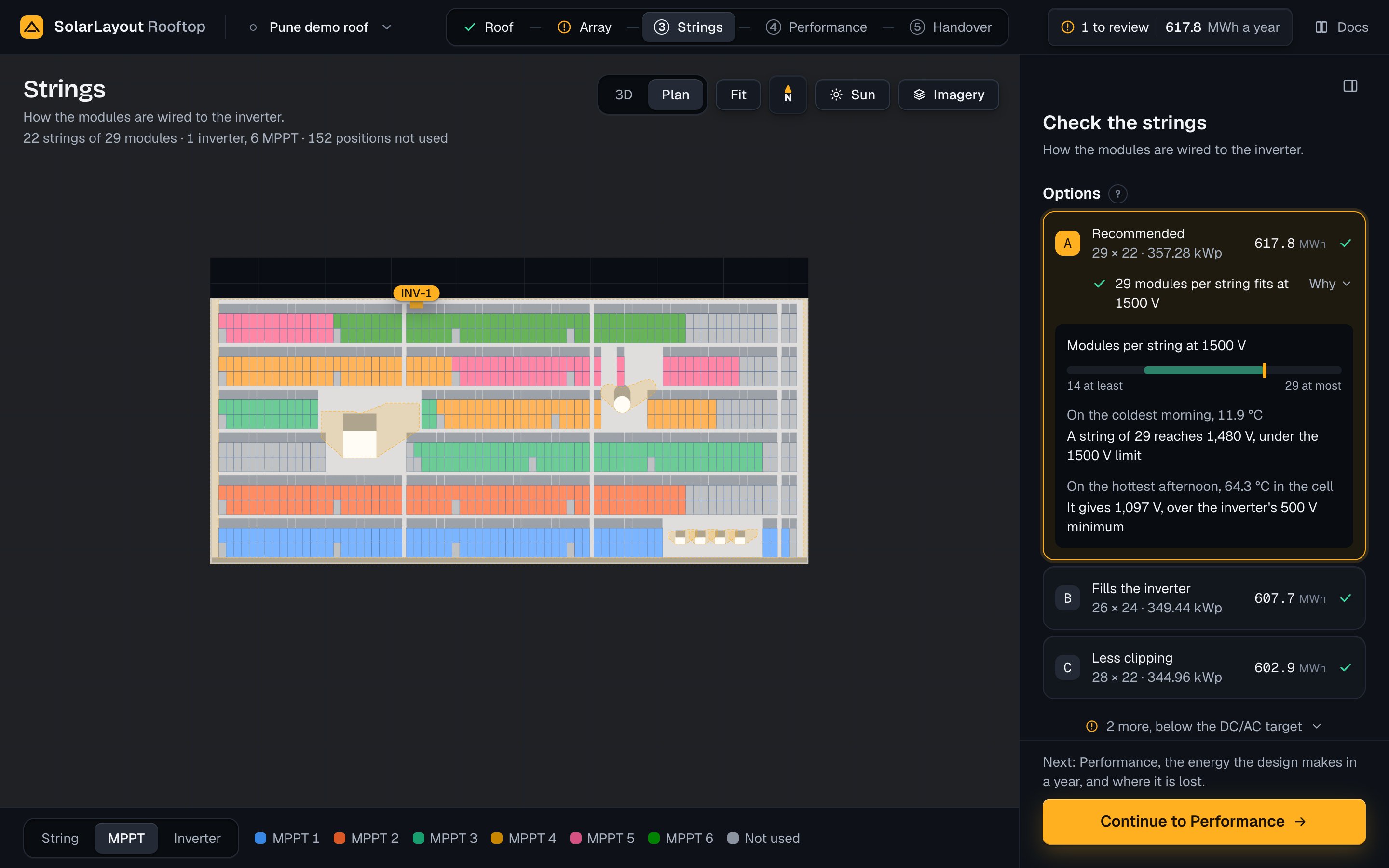
Under the chosen card, one line says whether its string length fits at the system voltage, as 25 modules per string fits at 1500 V with a tick. Why opens the proof (Why an option fits).
While a newer run is on its way, the options stand greyed out. At the first run, with nothing before it, the
step says Sizing the strings · a few seconds and grey blocks hold the cards' places.
On the demo, at 1500 V:
| Option | Caption | Modules per string × strings | DC capacity (kWp) | Inverters | Year 1 (MWh) |
|---|---|---|---|---|---|
| A | Recommended | 25 × 24 | 348.00 | 1 | 586.4 |
| B | Less clipping | 26 × 23 | 346.84 | 1 | 585.4 |
| C | Less clipping | 27 × 22 | 344.52 | 1 | 582.8 |
| D | Below target | 27 × 29 | 454.14 | 2 | 777.2 |
| E | Below target | 26 × 30 | 452.40 | 2 | 773.2 |
When an edit takes the chosen option away, the first option is chosen and a toast says Your stringing no longer fits. Option A is used., with Undo and Choose another.
How the options are made
How the options are made, under the cards, opens the rules with this inverter's numbers:
The options in the DC/AC target, 1.10 to 1.30, come first; those outside it come after, marked.- How many strings an MPPT takes, as
An MPPT takes at most 4 strings: 4 strings of 13.18 A stay under 65.0 A.on the demo. When the inverter file gives no current limit, the line says so and asks for the datasheet's value. The least shaded strings are used first.
A last line names the options that miss the target, as D (0.83) is under the target; E (0.82) is under the target. on the demo.
In full, the run works like this:
- Lengths. It tries up to three string lengths, longest first: the one nearest the inverter's nominal MPP voltage, the longest that fits, and, from the nominal up, the one that places the most modules. Where two coincide, it takes the longest but one. The nominal MPP voltage is the inverter file's own; when the file gives none, it is the middle of the voltages the file gives the inverter's efficiency at; when the file gives neither, the longest length stands for it.
- Strings per MPPT. As many as both current limits allow, the working current and the short-circuit current, and at least 1. With no current limit known, the inverter's inputs shared among its MPPTs. An inverter takes the MPPTs × the strings per MPPT, up to its inputs.
- Inverters. For each length the run tries 1 inverter, then more. For each count it takes the most strings that the inverters take, the roof holds and the DC/AC ratio allows at 1.30 or under, and keeps the count with the most strings that reaches 1.10 with at least 1 string on each inverter. Then it adds the strings that fill those inverters, and all the strings the roof holds on the fewest inverters that take them. These two can fall outside the target.
- Which strings. Strings within a row come before those that run across rows; in each group, the least shaded first.
- Kept. Each option is simulated for a full year. Those in the target come first, then the most energy. Five at most are kept, lettered A to E. The first is Recommended only when it is in the target. Your own option comes after them.
Why an option fits
Why under the chosen card opens the proof, headed Modules per string at <V> V:
- a band of the lengths that fit, from
<min> at leastto<max> at most, with a marker at the chosen length; - the coldest hour:
On the coldest morning, <t> °C, thenA string of <n> reaches <Voc> V, under the <limit> V limit(orover); - the hottest hour:
On the hottest afternoon, <t> °C in the cell, thenIt gives <Vmp> V, over the inverter's <min> V minimum(orunder).
Voc is the string's voltage with no current flowing, its highest on a cold module. Vmp is its working voltage, its lowest on a hot one. The two hours are the year's extremes, whatever the time of day:
- The coldest hour is the module at 1000 W/m² with its cells at the year's lowest ambient temperature. The string's Voc then must stay at or under the lowest of the system voltage, the inverter's highest DC voltage and the module's rating.
- The hottest hour is the module at 1000 W/m² with its cells at the highest ambient plus the cell rise. The string's Vmp then must stay at or over the inverter's MPPT minimum.
On the demo, option A: 25 modules per string fits at 1500 V, the band from 14 at least to 27 at most,
On the coldest morning, 11.9 °C with A string of 25 reaches 1,356 V, under the 1500 V limit, and On the hottest afternoon, 64.3 °C in the cell with It gives 961 V, over the inverter's 500 V minimum.
An option that misses its DC/AC target or an MPPT's current limit has the exclamation mark on its line, as
<n> modules per string at <V> V, and the proof gives the run's verdict: Voc at <t> °C is <x> V, limit <L> V. Vmp at a cell temperature of <t> °C is <x> V, MPPT minimum <m> V. <s> strings on <k> inverters, DC/AC ratio <r>, with what it misses. Where a current limit is the cause, a sentence names it:
The inverter file (OND) gives no current limit per MPPT. Enter the datasheet's value.INV-<i> · MPPT <list> carries <x> A, over the limit of <L> A.INV-<i> · MPPT <list> has an Isc of <x> A, over the limit of <L> A.
Your own option
Press Add your own option, under the cards, to wire the strings your way. The form, headed Your own option, holds three fields, each held to what fits:
| Field | Default | Range | What it does |
|---|---|---|---|
| Modules per string | The chosen option's | The lengths that fit, as 14 to 27 fit | The modules in series in each string |
| Strings | The chosen option's | From the inverters' count to the strings of that length the roof holds, as Strings of 25: 1 to 31 fit | The strings in parallel |
| Inverters | The chosen option's | 1 to the strings, 200 at most | The inverters the strings are shared among |
When you change your own option later, the form starts from it. Under the fields, the form says whether the
option is in the DC/AC target before you add it: Fits · <kWp> kWp · DC/AC ratio <r>, Under the DC/AC target · … or Over the DC/AC target · …. On the demo it starts at 25, 24 and 1: Fits · 348.00 kWp · DC/AC ratio 1.27.
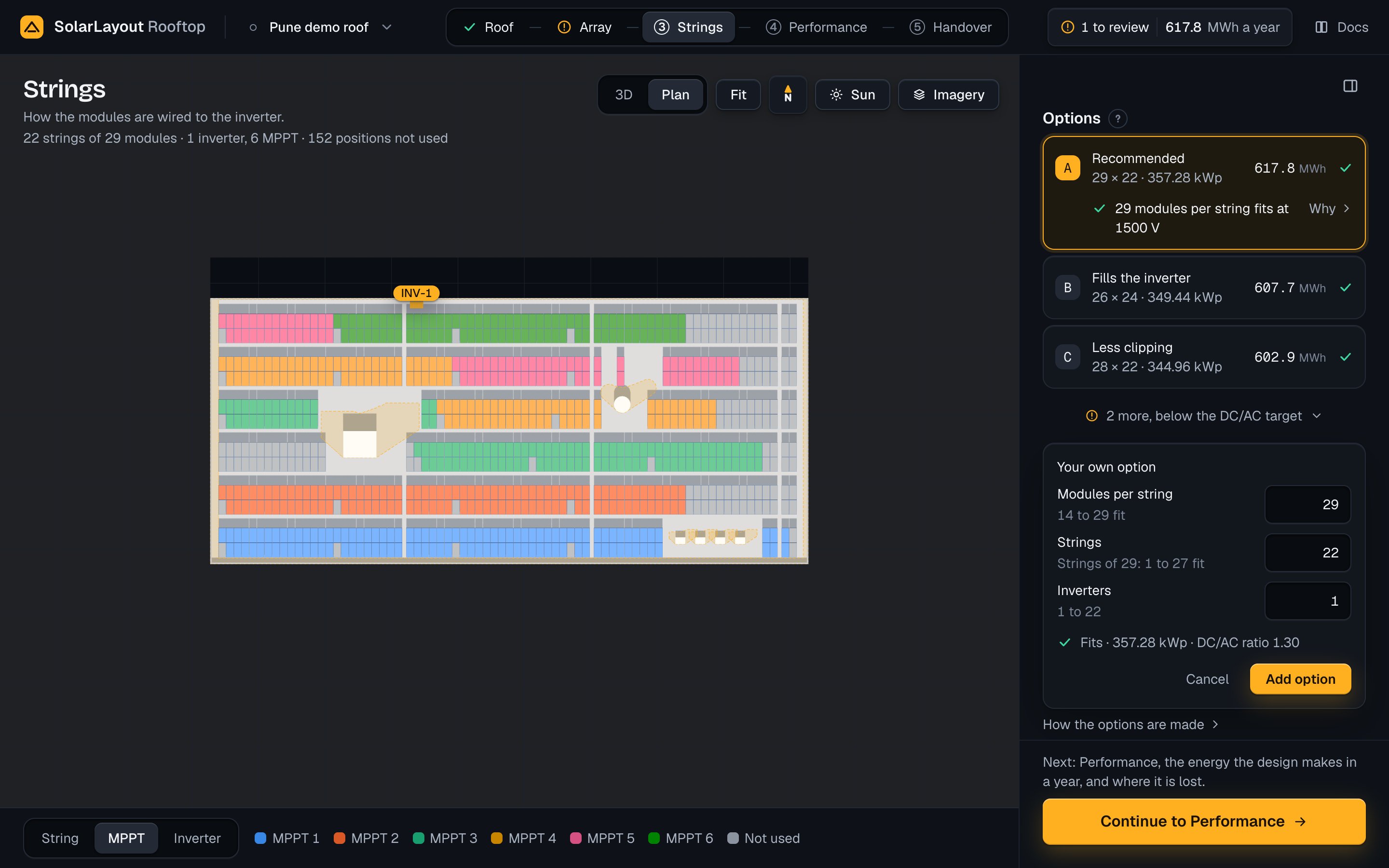
Press Add option (Change option when there is one) to add it. The app saves it in the design and
chooses it, the design runs again, and its card says Your own option. Change and Remove stand
under its card; removing it while it is chosen brings back the run's first option. Cancel closes the
form. The run's options never put more strings on an MPPT than its limits allow. Your own option's strings
are spread evenly over the MPPTs regardless, and its card then carries the exclamation mark.
When the app cannot build your option, its card gives the letter, Your own option, <s> × <t> · <k> inverters and why, with Change your option or remove it.:
| Title | Why |
|---|---|
A string of <n> does not fit at <V> V | At most <max> fit: Voc at <t> °C is <x> V, over the limit of <L> V., or its Vmp on the coldest hour is over the inverter's MPPT maximum |
A string of <n> does not fit at <V> V | At least <min> are needed: Vmp at a cell temperature of <t> °C is <x> V, under the MPPT minimum of <m> V. |
<s> strings cannot fill <k> inverters | Each inverter needs at least 1 string. |
Inverter
The inverter's card gives its model, its maker, its AC power and its MPPTs, the current per MPPT and its
inputs, and the file's name under the card. A design built on Find starts with the app's inverter, marked
Default: the WattPower WP-330KTL-H1, 275 kW, 6 MPPT, 28 inputs, an MPPT window of 500 to 1500 V and 65.0 A
per MPPT, worked out from its 390 A of DC input current. It is not in the library. Once you choose an
inverter, from the library or from your own file, the row says Yours.
The inverter sets how the strings are sized:
- its MPPT window sets the shortest string, and can set the longest;
- its highest DC voltage is one of the limits on a string's Voc;
- its AC power sets each option's DC/AC ratio, and so how many inverters an option takes;
- its MPPTs, its inputs and its current per MPPT set how many strings one inverter takes.
Choose an inverter
- Open Inverter and press Change. The window Choose an inverter lists the app's library of inverter files, or your own inverter file (OND).
- Type in the search: each word must be found in the maker, the model, the file's name or the power, as
<kW> kW. Or press Filter to narrow the list by AC power, MPPT and Max DC. - Choose a row, then press Use this inverter. A double click or Enter does the same.
The list opens sorted by AC power, low to high; press a column's head to sort by it. Its columns are
Inverter, AC kW, MPPT, MPPT V and, on a desktop, Max DC V; on a phone an Order list
takes their place. A row is tagged In this design or Preliminary (a file its maker calls preliminary). A
row rated under the system voltage says Up to <r> V: strings sized to <r> V, not <V> V.
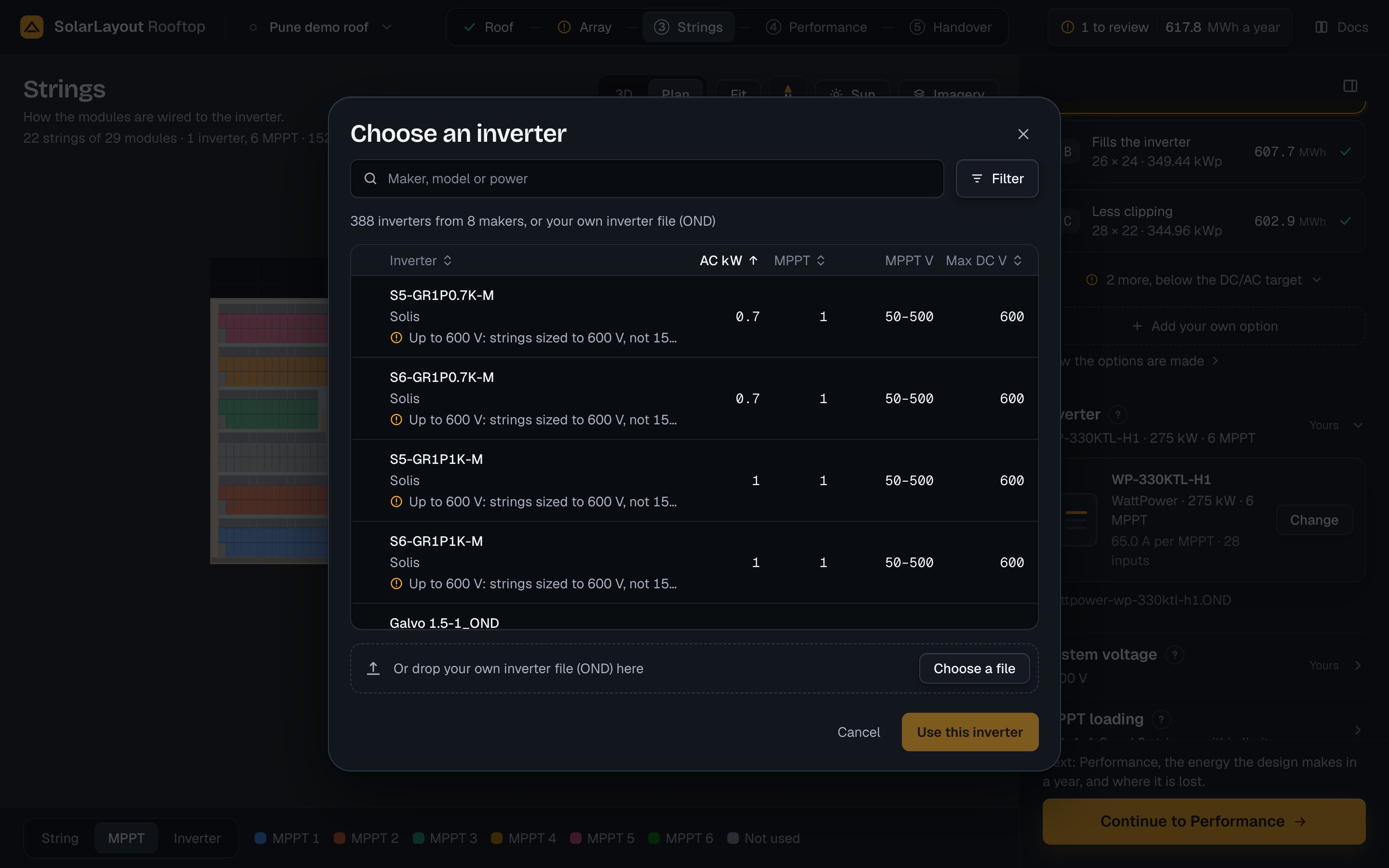
For an inverter the library does not hold, drop its inverter file (OND) under the list, or press Choose a
file; on a phone, press Choose your own inverter file (OND). A file over 256 KB is refused before it
is sent. A file the app cannot read leaves the inverter as it was, with Inverter not changed and the
reason. The files Rooftop reads are in Equipment files. A new
inverter goes into the design, clears any current per MPPT you entered, and the design runs again.
Inverter limits and cabling
| Field | Default | Range | What it does |
|---|---|---|---|
| Current per MPPT (A) | The inverter file's current per MPPT, else its DC input current ÷ its MPPTs | 1 to 2000 | Replaces both current limits of each MPPT, the working and the short-circuit current. Use the file's gives the file's value back |
| AC cable per inverter (m) | 30 | 1 to 2000 | The AC cable in the bill of materials |
The hint under Current per MPPT says where the value comes from, as 65.0 A · max DC current 390 A ÷ 6 MPPT on the demo. When the file states no current per MPPT, a note says Not in the OND: IMaxDC <n> A ÷ <m> MPPT. Enter the datasheet value if it differs. When the file gives neither, the card says Current per MPPT not in the inverter file with an exclamation mark: type the datasheet's value here.
System voltage
The system voltage is the highest DC voltage of the system. It caps the modules in a string, with the inverter's and the module's ratings, and the bill of materials names the DC cable by it.
| Field | Default | Range | What it does |
|---|---|---|---|
| System voltage | 600 V in the United States, its territories and Canada; 1000 V elsewhere | 600 V, 1000 V, 1500 V | Caps the modules in a string. A press makes the value yours, and the design runs again |
The app sets the voltage from your country on a new design, and on a project file opened without one. The country is the one your connection comes from, else your device's
time zone, else India. The demo is at 1500 V, marked Yours.
Beside the heading, the words say who set it: Set for <country>, as Set for India or Set for the United States, for the app's value for your country; Default for the app's value for a country that is not
yours; Yours for a voltage you chose.
While the app's value stands, the line under the choice says where it comes from, as 1000 V, the usual limit for rooftops in India. Change it if the site needs another. or 600 V, the limit for homes in the United States (NEC 690.7). Change it if the site allows more. (CE Code, Section 64 for Canada).
The equipment never moves the voltage. Strings are sized to the lowest of the system voltage, the inverter's highest DC voltage and the module's rating; a module file without a rating is taken at 1000 V. When the inverter or the module is rated under the voltage, the step says so:
- with the app's value, a line such as
Strings sized to <r> V, this inverter's limit.; - with yours, a note with an exclamation mark that ends
Your system voltage is <V> V, and the bill of materials uses it., and a button Use <m> V for the voltage that matches.
The app never raises the voltage either; it offers it. When the inverter takes more, the step says This inverter takes up to <r> V. Raise it only if the site's code allows. with a button such as Use 1500 V.
When no string length fits and a higher voltage would fit one, the offer is No string length fits at <V> V. One fits at <W> V. Raise it only if the site's code allows. Press it only where the site's code allows.
Modules per string
The lengths that fit are worked out from the module at 1000 W/m², at the site's sizing temperatures:
- The shortest: the inverter's MPPT minimum ÷ the module's Vmp at the highest ambient plus the cell rise, rounded up.
- The Voc limit: the lowest limit ÷ the module's Voc at the lowest ambient, rounded down.
- The MPPT maximum: the inverter's MPPT maximum ÷ the module's Vmp at the lowest ambient, rounded down.
- The longest: the smaller of the Voc limit and the MPPT maximum.
The module's Voc on a cold morning comes from its one-diode model. With a Voc coefficient typed, it is Voc at STC × (1 + μ ÷ 100 × (Tmin − 25)), as IEC 62548-1 Annex F gives it.
When there are no options, the Modules per string bar stands in their place. Its heading says <min> to <max> fit or None fit, and its ends name what sets them: <min> · MPPT minimum and <max> · Voc limit
(or · MPPT maximum). The run's note on the limit says which rating sets it, as Limit <L> V: the lowest of the system's, the module's (<m> V) and the inverter's (<i> V) ratings.
Sizing temperatures
The closed row gives the two ambients, as 11.9 to 39.3 °C on the demo. Each field is empty while the app's
value stands, and its hint gives that value. A value you type says Yours · default <value> with Reset.
| Field | Default | Range | What it does |
|---|---|---|---|
| Lowest ambient (°C) | From the weather: the weather year's lowest air temperature; 5 °C with no weather | −50 to 40 | Sets the cold Voc and the cold Vmp: the longest string |
| Highest ambient (°C) | From the weather: the weather year's highest air temperature; 40 °C with no weather | 0 to 60 | With the cell rise, the hot Vmp: the shortest string |
| Cell rise (°C) | By the roof type: 25 on a flat roof, 35 on a sloped one | 0 to 60 | Added to the highest ambient for the hottest cell |
| Voc coefficient (%/°C) | Computed from the module file | −0.999 to −0.001 | The cold Voc by the datasheet's coefficient, in place of the module's model |
A Voc coefficient outside the usual range for crystalline silicon, −0.35 to −0.20 %/°C, has a note under the field asking for the datasheet's value. On the demo the value computed from the module file is −0.256 %/°C, inside the range, and no note shows.
MPPT loading
MPPT loading shows the chosen option's strings on each MPPT and their current against its limit. Closed,
the row lists the strings on each MPPT and says within limits, over a limit or a limit not known.
Open, a table titled Option <letter>: <n> strings on <m> MPPT, at <V> V (with of <k> inverters when
there is more than one) gives one row for each MPPT that has strings:
| Column | What it gives |
|---|---|
| MPPT | MPPT <j>, with its inverter, INV-<i>, under it |
| Strings | The strings on it |
| Current | Imp, the working current, and Isc, the short-circuit current, each as <x> of <limit> A, or <x> A with no limit |
| kWp | Its strings × the modules per string × the module's power, with the mark Fits, Over the limit or Limit not known |
The app shares the option's strings among its inverters in blocks, in layout order, then over each inverter's MPPTs as evenly as they go. An MPPT's Imp is its strings × the module's Imp, its Isc its strings × the module's Isc. Imp is held to the file's current per MPPT, else the DC input current shared among the MPPTs; Isc to the file's short-circuit current per MPPT, else the same limit. A Current per MPPT you type replaces both.
On the demo, option A: Option A: 24 strings on 6 MPPT, at 1500 V. Each of the six MPPTs takes 4 strings,
52.7 of 65.0 A and 55.7 of 65.0 A, 58.00 kWp. All fit.
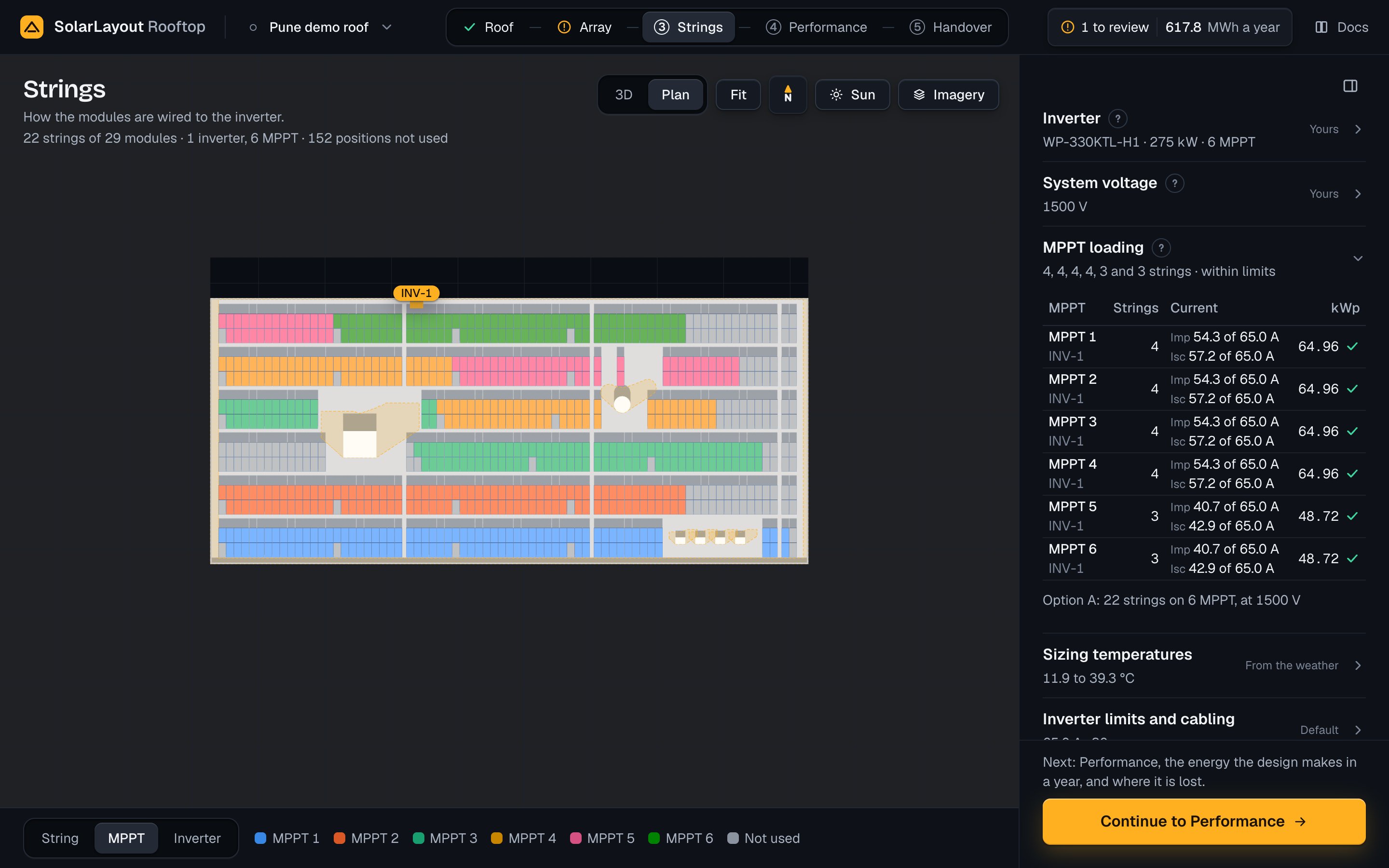
When a limit is not known, the file's note stands under the table with Enter the current per MPPT, which opens Inverter limits and cabling with the cursor in Current per MPPT. Type the datasheet's value. Until then the option carries an exclamation mark.
Strings on the roof
On the Strings step the stage draws the chosen option's strings over the modules. Colour the strings by
chooses String, MPPT or Inverter; it starts at MPPT and belongs to the view. Six colours
take turns; positions the option does not use are grey, Not used.
- The legend, on a desktop and a tablet, is a bar at the stage's foot, beside the switch. It gives one
entry a colour, as
MPPT 1orINV-1, or by string the strings of each colour, asS1 · S7 · S13 · S19, withBy string: <n> colours in turn along the rows. On a phone the switch and a short legend head the sheet. While the strings are not yet of the layout shown, it saysWiring the strings. - One string. On a device with a pointer, hover a string to trace it; press or tap it to select it. The
string turns white and the rest dim. Its callout reads
String S<n> · MPPT <j>(String S<n> · INV-<i>, MPPT <j>with more than one inverter) and<m> modules · <x> % shaded · Voc cold <v> V · <l> m of cable, the shading the mean near shading of its modules. On the demo:String S1 · MPPT 1and25 modules · 0.0 % shaded · Voc cold 1,356 V · 140 m of cable. - The inverters stand as boxes with a chip,
INV-1, on the edge-margin line at the point nearest the middle of their strings' starts. The edge margin is set on the Roof step (Edges and access).
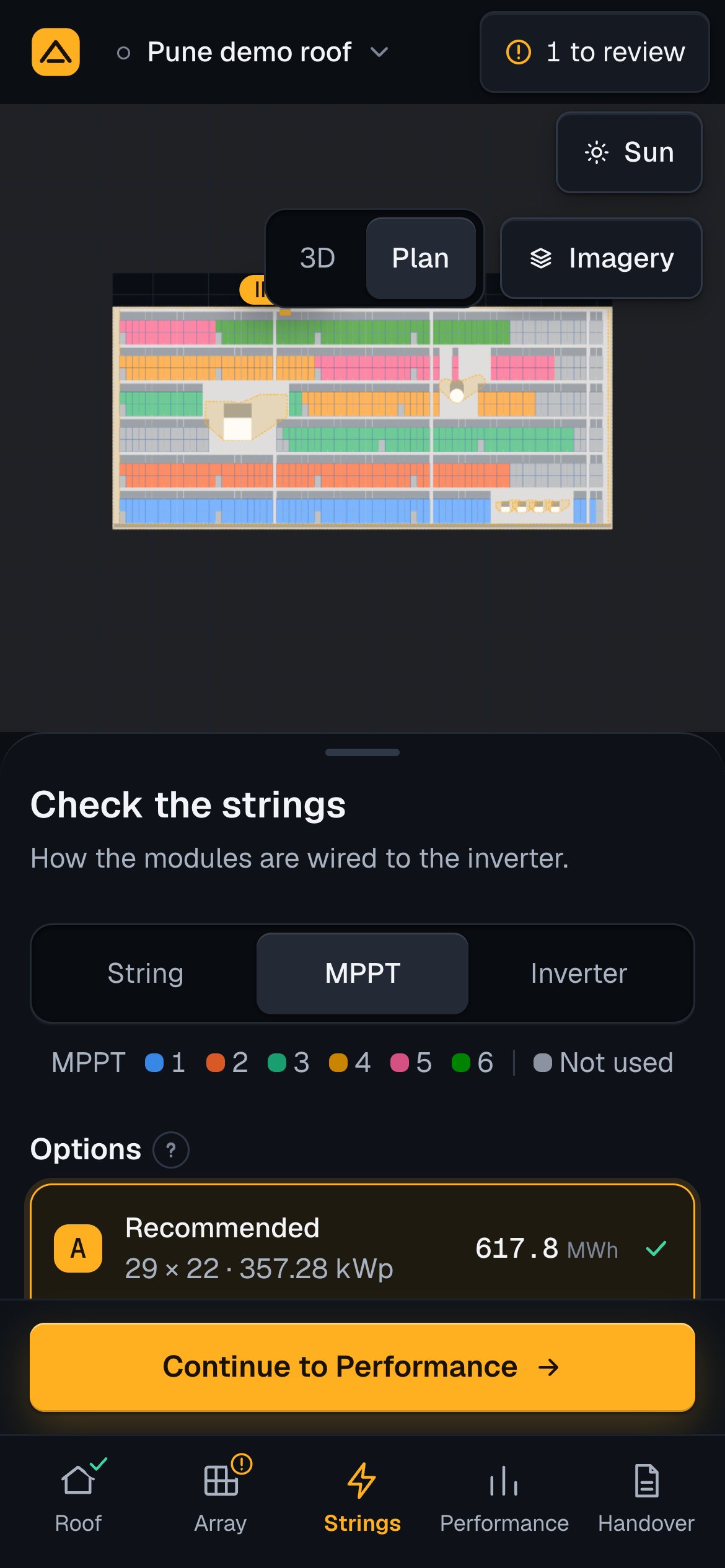
The run forms the strings along a row, out along its top line of modules and back along the bottom. What a row leaves at its end runs on into the next row of the same tilt and direction, a string across rows. On an east-west roof a string runs along one side of a unit and on into the same side of the next, never mixing east and west. An option uses the least shaded strings first, by each string's string shading loss over the year (Shade over the year).
When no string length fits
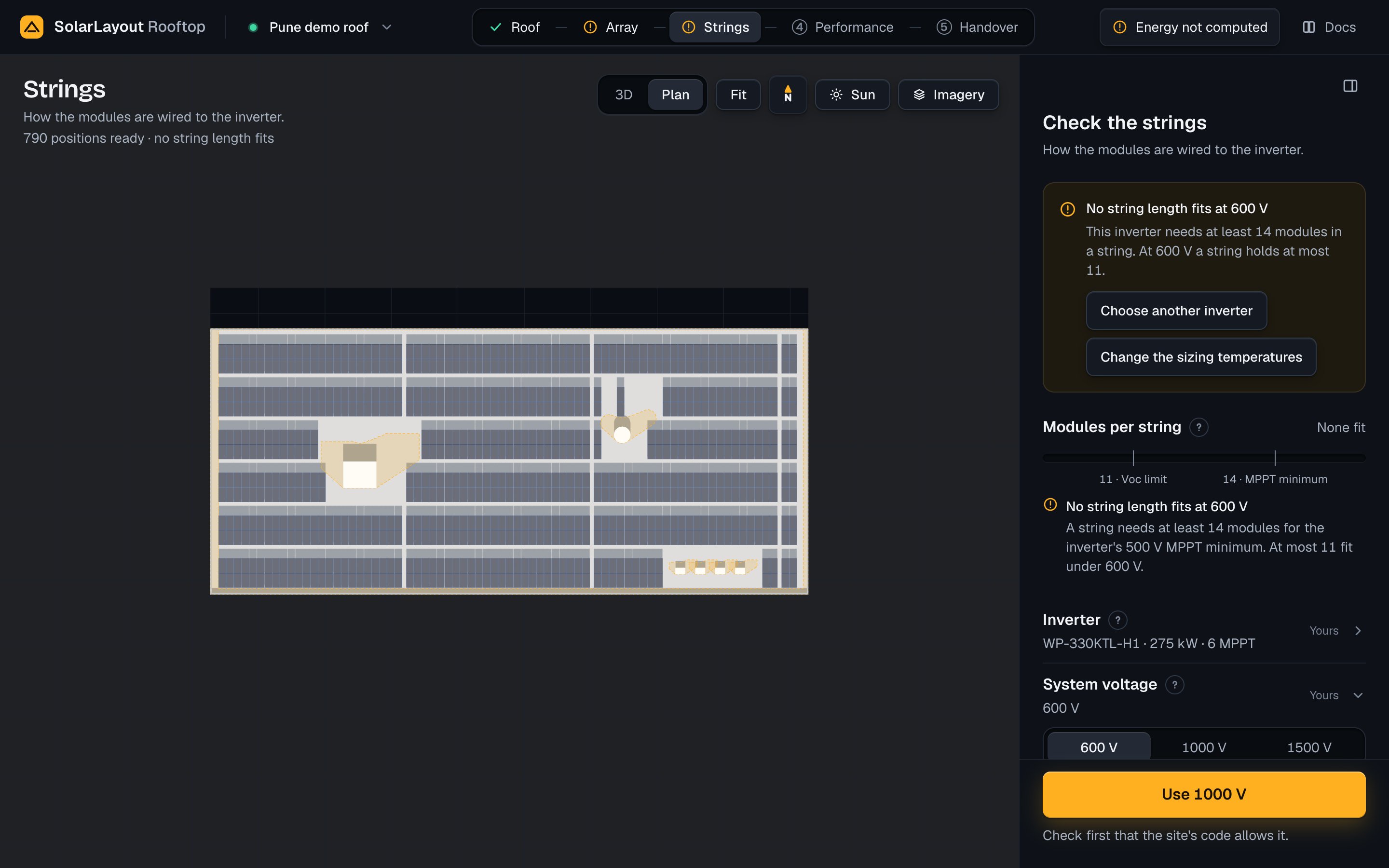
When the fewest modules the inverter needs in a string are more than a string can hold at the system
voltage, no string length fits, and the run builds no option, your own included. The step is marked as
needing you, and the result chip says Energy not computed (The result).
- The head of the work column says
No string length fits at <V> VandThis inverter needs at least <n> modules in a string. At <V> V a string holds at most <m>., with Choose another inverter (opens the library) and Change the sizing temperatures (opens Sizing temperatures). - The Modules per string bar stands in place of the options and says
None fit, its two ends marked, with the reason:A string needs at least <n> modules for the inverter's <m> V MPPT minimum. At most <k> fit under <L> V. - System voltage offers a higher voltage where the equipment takes one and it would fit a string, with a button such as Use 1000 V.
- The step's primary becomes the same button, Use <W> V, with
Check first that the site's code allows it.under it. Pressed, it sets that voltage as yours.
The demo at 600 V shows the case: No string length fits at 600 V and This inverter needs at least 14 modules in a string. At 600 V a string holds at most 11. The offer reads No string length fits at 600 V. One fits at 1000 V. Raise it only if the site's code allows., and the primary is Use 1000 V. Press it
only where the site's code allows; else choose another inverter, one whose MPPT minimum a shorter string
reaches, or check the sizing temperatures.
The other cases in which the step has no option:
| Message | When | Where |
|---|---|---|
Too few positions for a string · The roof holds <n> positions, and a string takes <a> to <b> modules. A string of <s> fits. Add it as your own option. (or No string of that length fits.) | No length tried forms an option | Options, with Add your own option under it when a length fits |
No module fits on this roof · The roof has no room for a module inside the edge margin and clear of shade. Check the outline, the edge margin and the obstacles. | The layout is empty | Options; the result chip offers Open Roof |
More answers are in Troubleshooting.
The Sun view
The sun and its shadows on the roof at any hour, the shade map of the modules, the year's loss to shade by its cause, and how the app works it out.
Performance
The energy the design sends to the grid, where it is lost, the weather it is computed from, 25 years of output and the model behind the figures.