Array
Choose the module, set how it is mounted and how far apart the rows stand, and see how the app places the array on the roof.
Array is the second of the five steps in SolarLayout Rooftop. It holds the module, how it is mounted, and how the rows are spaced so that they do not shade each other. From these and the roof, the app places the array: each position a module can take, in rows and tables, clear of the edges, the obstacles and their shadows.
The step's head says Choose the module, with "The module, how it is mounted, how rows are spaced." Its work column holds three sections: Module, Mounting and Spacing. Module is open the first time; then each section stays as you left it on this device. The work column explains rows, fields and the primary button. A change to any value here lays the roof out again, then runs the design. Continue to Strings at the column's foot goes on, with "Next: Strings, how the modules are wired to the inverter." until Strings has been opened once for this design (not on a phone).
On a computer the line under the stage's title reads
<n> positions · <n> tables · <n> rows · <area> m² of modules, on the demo
790 positions · 28 tables · 6 rows · 2,041 m² of modules. The area is of
all positions, not only of those the chosen option uses. While a layout is
on its way the line is dimmed with a ring, and the modules of before stay.
Module
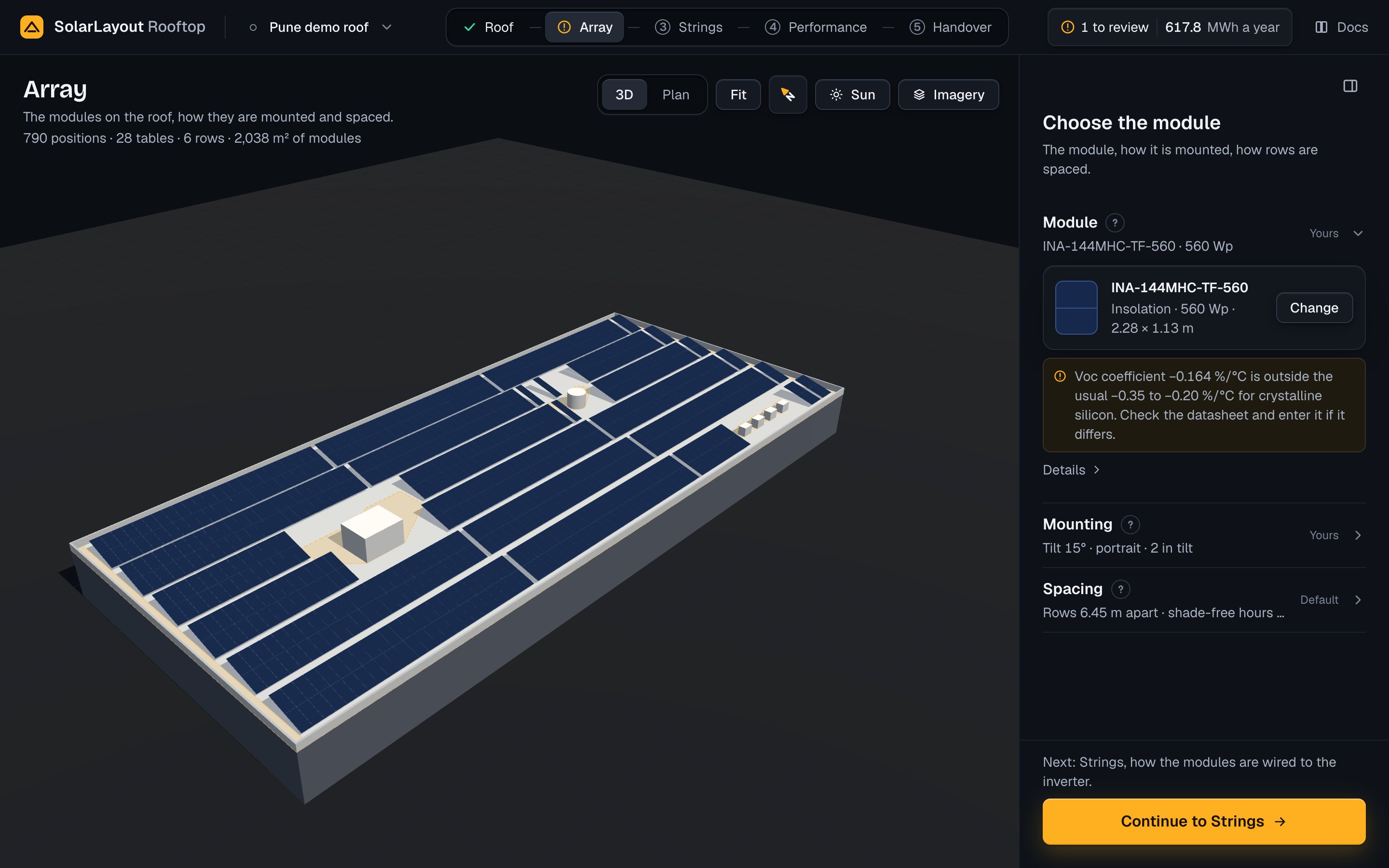
Closed, the section reads <model> · <Wp> Wp. Its word turns to Yours
once you choose a module. Open, its card gives the model in bold,
<maker> · <Wp> Wp · <length> × <width> m (sizes to two decimals) and
Change. A design starts with the app's own module, BiN-08-580 by Waaree:
580 Wp, 2.278 × 1.134 m, bifaciality 0.80, Voc 52.50 V, Isc 13.93 A, and a
Voc coefficient of −0.260 %/°C stated in its file. Its card reads
Waaree · 580 Wp · 2.28 × 1.13 m. The same module is in the library.
Details opens the module's electrical figures: Open-circuit voltage (Voc) in V, Short-circuit current (Isc) in A, Bifacial, rear gain for a bifacial module, and the Voc coefficient in %/°C, how much the voltage rises as the module gets colder.
The module sets more than the layout:
- Its size, with the orientation, sets each position's footprint, and so how many fit.
- Its Voc, its temperature coefficients and its own highest voltage set how many modules a string holds. See Modules per string.
- Its currents set how many strings an MPPT, the inverter input that tracks a group of strings, takes.
- Its rated power sets the system's size in kWp, the DC/AC ratio (DC kWp over the inverter's AC kW) of each option, and the energy.
A module chosen lays the roof out again and runs the design. Notes stand under the card with a note mark. A Voc coefficient outside the usual −0.35 to −0.20 %/°C for crystalline silicon is one: enter the datasheet's value under Sizing temperatures on the Strings step, or in the note's own field in the notes to review. A file that gives no size of the module is the other: choose a module file that has it.
Choose a module
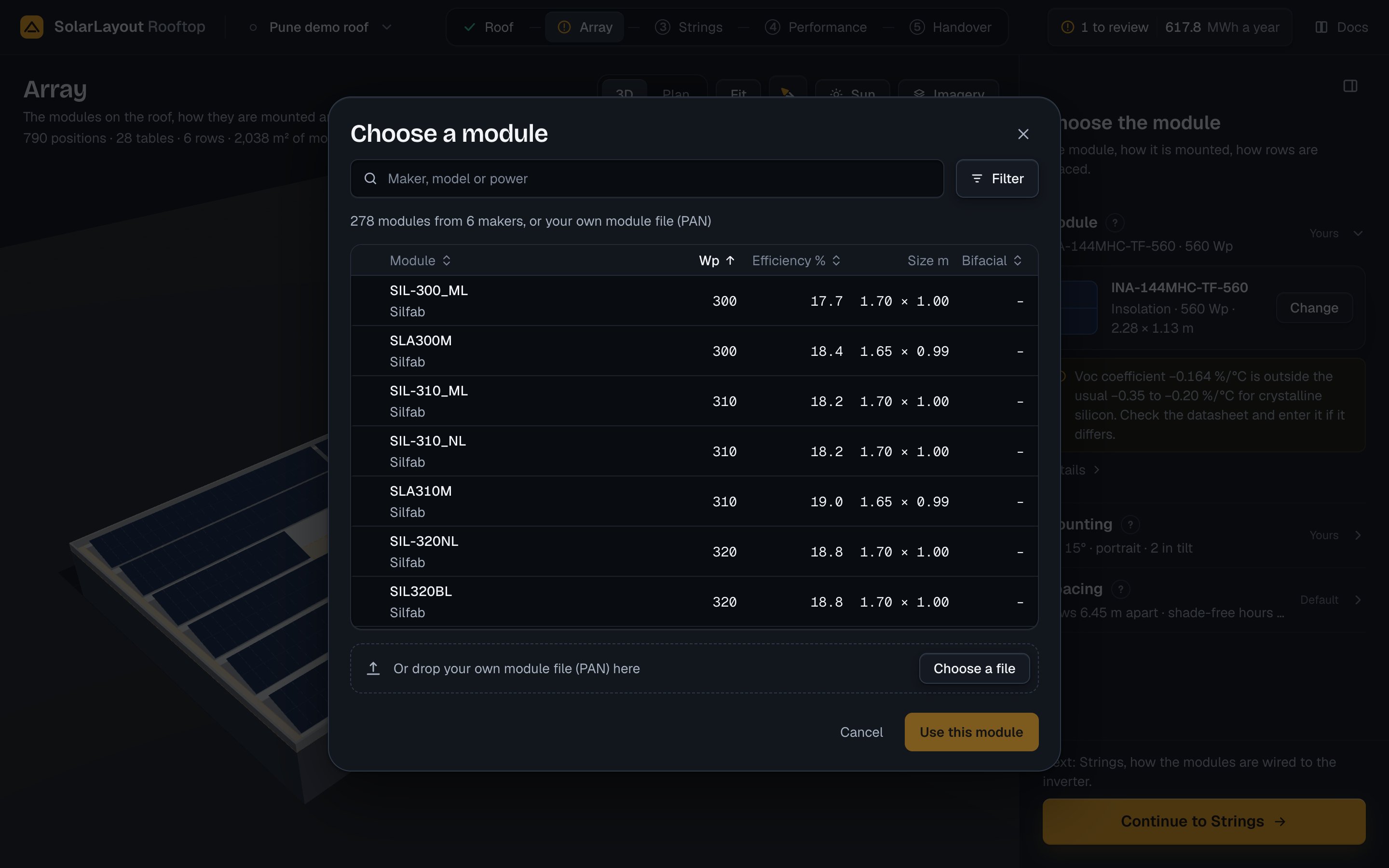
Change opens Choose a module: the app's library of module files, or your own module file (PAN). Searched or filtered, the line over the list says how many of the modules show, with Clear the filters.
Type in the search ("Maker, model or power"): each word must be found in the
maker, the model, the file's name or the power as <Wp> Wp. Filter narrows
the list by Power, in steps of 5 Wp, and reads Filter · on while it does;
each opening starts with the filters at rest. The list opens by power, low to
high; press a column's head to sort by it (on a phone, the select Order).
Click a row, then press Use this module; a double-click or Enter does the
same. A module chosen from the library is tagged "In this design" when you
open the window again, and the list opens on it.
| Column | What it shows |
|---|---|
| Module | The model, the maker under it (with the data source where one model comes in two files) |
| Wp | The rated power |
| Efficiency % | To one decimal |
| Size m | <length> × <width>, two decimals; not sortable |
| Bifacial | The bifaciality, "–" for a monofacial module; on a computer only |
While a file is read the primary reads Reading; Cancel gives it up.
Your own module file (PAN)
For a module the library does not hold, use its module file (PAN): drop it
on the strip under the list, or press Choose a file (on a phone, Choose
your own module file (PAN)). The chooser offers .pan and .PAN files of
up to 256 KB, read as UTF-8, then Latin-1, then cp1252.
The app reads the manufacturer and model, the rated power, the width and height (values of 100 or more are millimetres; the longer side is the length), the technology and cell layout, Isc, Voc, Imp and Vmp, the temperature coefficients, the one-diode parameters, the highest system voltage (1000 V when the file has none), the bifaciality, the LID loss and the IAM profile.
A file without its rated power, Voc or Isc is refused: the picker says Module not changed with the reason, and the module of before stays. A file without a width and height is read, with a note, but the layout cannot place it.
Mounting
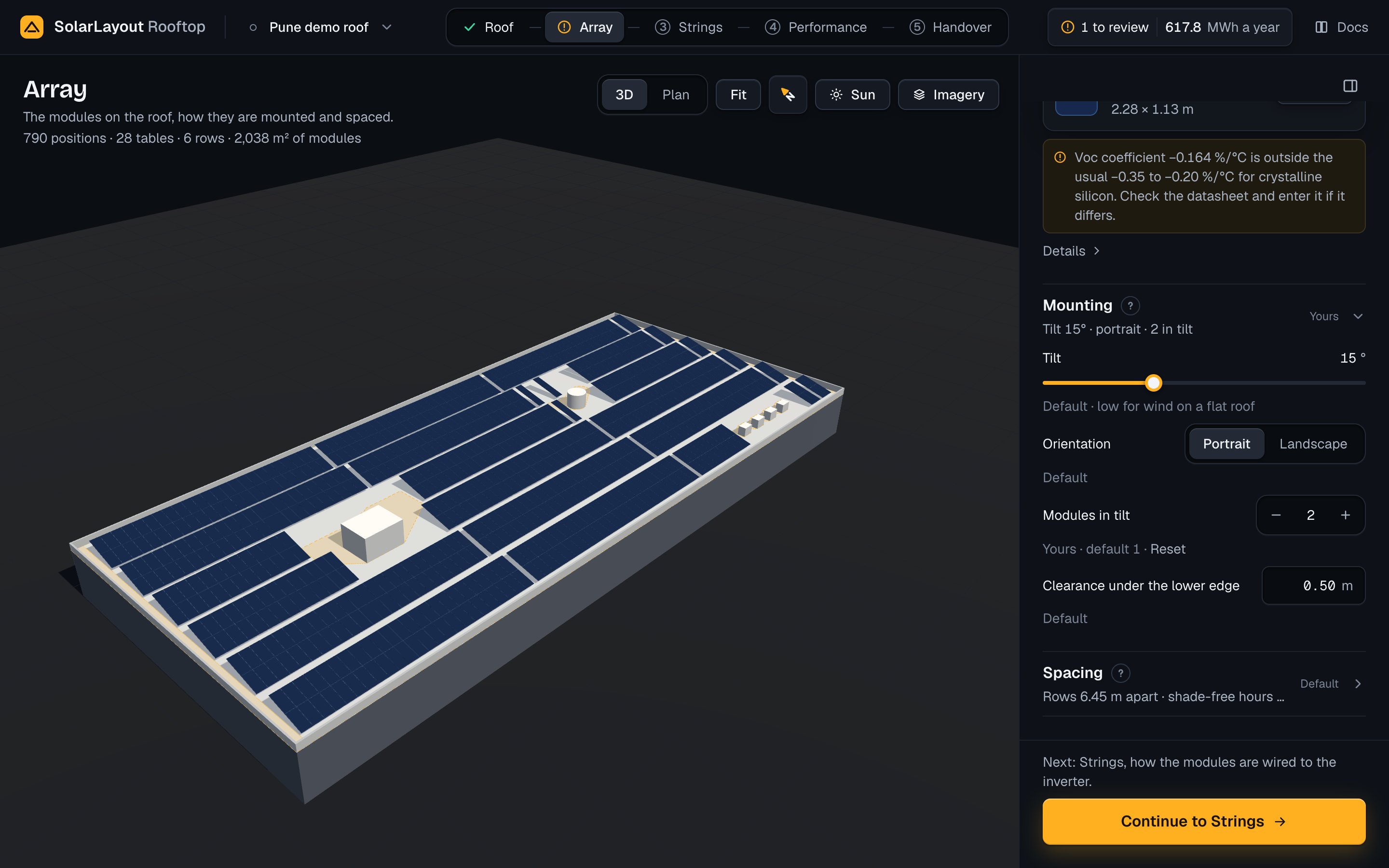
Mounting sets the modules' tilt, their orientation and how many stand in
each row's height. Its fields follow the roof type, set on the Roof step
(Roof type). Closed, it reads
Tilt <t>° · <orientation> · <n> in tilt on tilted rows (the demo:
Tilt 15° · portrait · 2 in tilt), East-west <t>° · ridge gap <g> m, or
Flush at <pitch>° · <orientation> · <n> in tilt on a sloped roof.
| Field | Default | Range | What it does |
|---|---|---|---|
| Tilt | 15°. Hint "Default · low for wind on a flat roof" | 0–45°, steps of 1° | The modules' angle from flat. The slider commits when you let go |
| Orientation | Portrait | Portrait, Landscape | Portrait puts the module's long side up the slope, Landscape its short side |
| Modules in tilt | 1. Hint "Default · one module up each row" | 1–4 | Modules one above another in a row. A table's depth up the slope is n × the side up the slope + (n − 1) × 0.02 m |
| Clearance under the lower edge | 0.50 m | 0–3 m | The lower edge's height above the roof, and the height at which obstacle and parapet shadows are worked out |
Modules stand 0.02 m apart on all roof types; no control sets the gap. Under
each field stands who set it: Default, or Yours · default <value> with
Reset, which gives the app's value back. The demo has 2 modules in tilt:
Yours · default 1 · Reset.
A steeper tilt or more modules in tilt makes a row taller: its shadow grows, and rows spaced by the shade-free hours stand further apart. The orientation changes the size of each position, and so how many fit along a row. A higher lower edge keeps less of the roof clear, since obstacle and parapet shadows are worked out at its height. The tilt also changes the sunlight on the modules, and so the energy.
Keep the app's values unless the racking fixes them, or the other orientation fits more modules.
Spacing
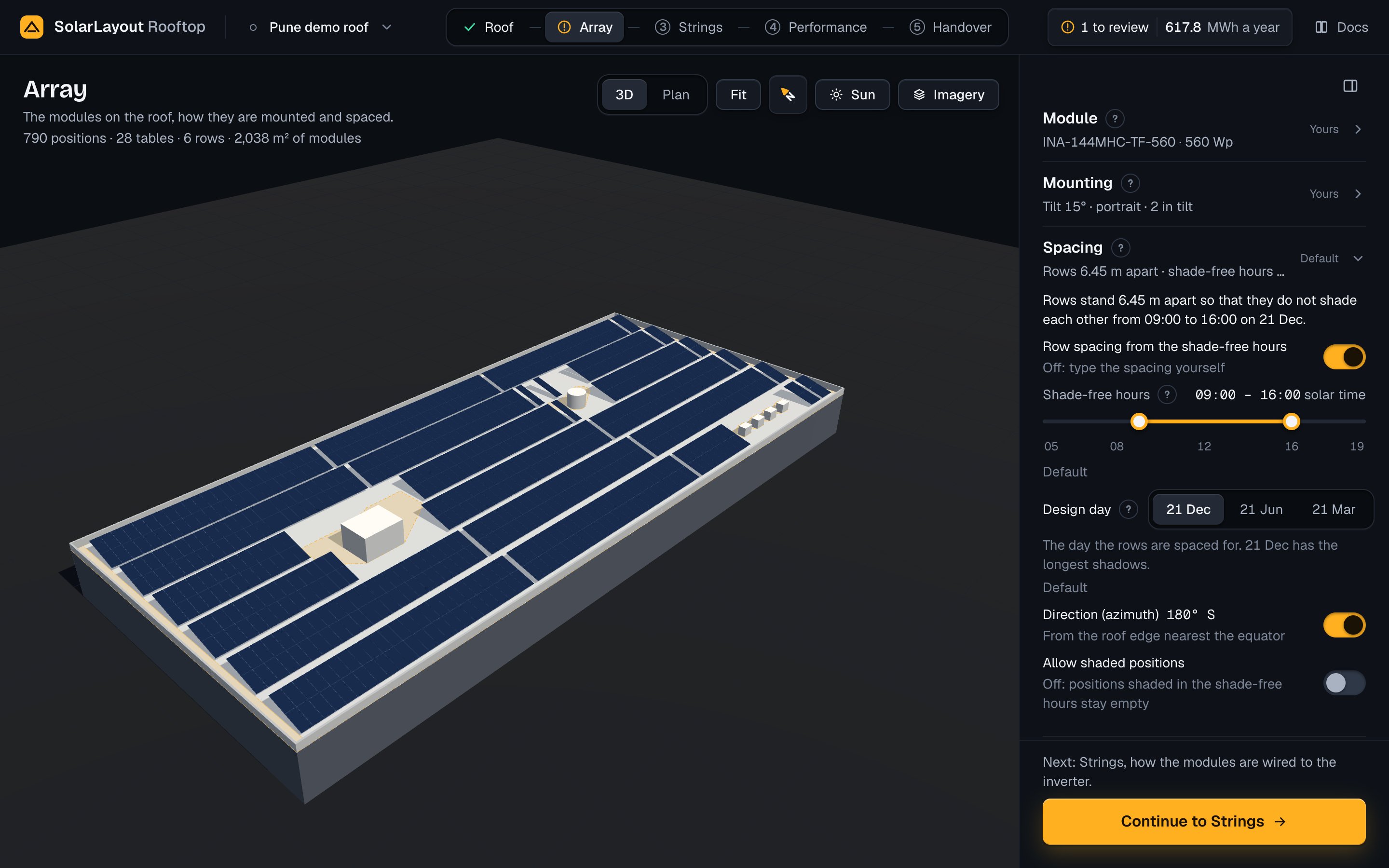
Spacing sets how far apart the rows stand, the hours and the day they keep
free of each other's shade, the way they face, and whether shaded positions
hold modules. Closed, it reads Rows <p> m apart · shade-free hours <start> to <end> on tilted rows (the demo: Rows 6.45 m apart · shade-free hours 09:00 to 16:00), Direction <az>° · shade-free hours … on east-west, and
Shade-free hours … on a sloped roof.
On tilted rows, a sentence at the top gives the result: "Rows stand 6.45 m
apart so that they do not shade each other from 09:00 to 16:00 on 21 Dec."
With a spacing typed, it reads Rows stand <p> m apart. The shade-free spacing is <f> m.
The fields, in the section's order:
| Field | Default | Range | What it does |
|---|---|---|---|
| Row spacing from the shade-free hours (switch; tilted rows) | On: the app spaces the rows. The line under it reads "Off: type the spacing yourself" | Off: a field Row spacing, 0.5–30 m, filled with the last layout's spacing, and the line Shade-free spacing <f> m | Row spacing, or row pitch: the distance on plan from one row's front edge to the next row's. On, it is shade-free over the shade-free hours of the design day |
| Shade-free hours | 09:00 to 16:00 solar time | 05:00 to 19:00 by the quarter hour | The hours of the design day in which rows, obstacles and the parapet must not shade the modules. See Shade-free hours |
| Design day | The winter solstice of the roof's side of the equator | 21 Dec, 21 Jun, 21 Mar | The day the hours are on. See Design day |
| Direction (azimuth), with the switch Follow the roof edge (tilted rows, east-west) | On: <deg>° <compass>, "From the roof edge nearest the equator" (east-west: "Ridges square to the roof edge nearest the equator") | Off: a field 0–359.9°, filled with the last layout's, and the line Roof edge nearest the equator: <deg>° <compass> | The way the rows face, clockwise from north |
| Allow shaded positions (switch) | Off: "Off: positions shaded in the shade-free hours stay empty" | On: "On: positions shaded in the shade-free hours are used too" | On, the kept-clear areas hold modules, and their shade counts in the energy |
An east-west roof has no row spacing: its units stand side by side, with a gap only where the shade-free hours need one. A sloped roof has neither row spacing nor direction: its rows follow one another up the roof and face the way it slopes.
The row spacing, the direction and the shaded positions say nothing under
them while the app's value stands: the switch says what the app does.
Changed, they read Yours · default … with Reset. Reset, or turning its
switch back on, gives the row spacing or the direction back to the app. The
section's word is Yours when any of its five fields is yours.
Type a spacing when the racking fixes it, or when the client takes some shade for more modules: the sentence then gives the shade-free spacing beside yours. Rows closer together fit more modules and shade each other more; the energy counts that shade. Turn off Follow the roof edge when the rows must face another way than the roof edge.
Shade-free hours
Shade-free hours is a slider with two handles, on the Array step under
Spacing, with its own ? disc. It reads 09:00 – 16:00 solar time at the
right of its label. Solar time is the time by the sun: noon is when it stands
highest; no clock time zone applies.
The track runs from 05:00 to 19:00 by the quarter hour, the two handles at
least 15 minutes apart. When you let go, the start is set to 12:00 at the
latest and the end to 12:00 at the earliest: a start let go at 14:00 sets
12:00. Under the slider the hint reads Default, or
Yours · default 09:00 to 16:00 with Reset.
The app follows the sun through these hours of the design day, at each quarter hour. On all roof types the area that obstacle and parapet shadows cross stays free of modules, unless Allow shaded positions is on. On tilted rows, while Row spacing from the shade-free hours is on, the rows stand far enough apart that one does not shade the next. East-west units get a gap only where these hours need one, and a note gives it.
The hours shape the layout alone. The energy counts the shade on each module in each hour of the weather year. Widen the hours to keep more of the day free of shade: rows stand further apart, more of the roof around obstacles stays empty, and fewer modules fit. Narrow them to fit more modules, with more shade outside the hours.
Design day
Design day is the day the rows are spaced for. It stands in Spacing, under the shade-free hours, with its own ? disc. Three buttons choose it:
| Roof's side of the equator | Buttons, in order | Default |
|---|---|---|
| North | 21 Dec, 21 Jun, 21 Mar | 21 Dec |
| South | 21 Jun, 21 Dec, 21 Mar | 21 Jun |
Under it: "The day the rows are spaced for. 21 Dec has the longest shadows."
(21 Jun south of the equator), then the hint Default, or
Yours · default winter solstice with Reset.
Keep the winter solstice: the sun stands lowest and the shadows are longest, so rows spaced for it stand furthest apart. With the shade-free hours, the design day sets the row spacing on tilted rows, the gap between east-west units and the kept-clear areas around obstacles and the parapet.
Change it when the client takes some winter shade between the rows for more modules: a day nearer summer gives shorter shadows, so the rows stand closer. The Sun view shows the design day unless another day is chosen there; see The time and the day.
How the layout is placed
The layout reads the roof, the array and the module. It does not read the weather, the inverter or the system voltage, so a change on the Strings step or in Performance never moves a module.
The frame and the rows' direction
The app turns the roof about its centre so that the array faces south in its own frame, and lays rows along that frame's east-west line (east-west units along its north-south line). The direction it takes, with Follow the roof edge on, is the outward side of the roof's smallest enclosing rectangle nearest the direction of the equator (180° north of the equator, 0° south of it), to 0.1°. On a sloped roof the direction is the slope's.
Where modules may stand
Modules may stand on the roof inside the edge margin (the largest piece, if the margin splits the roof), less each obstacle grown by its clearance, less the kept-clear areas unless shaded positions are allowed. A table, all its modules up the slope, is placed only where its whole footprint lies inside that area; on an east-west roof each side of a unit is tested alone.
Kept-clear areas
A kept-clear area is the ground a shadow crosses in the shade-free hours. The app casts the shadows of the parapet and of each obstacle onto the plane of the modules' lower edge: the Clearance under the lower edge on tilted rows and east-west units, 0.1 m on a sloped roof. It takes the sun at 15-minute steps through the shade-free hours of the design day, and joins the shadows.
Each area has its cause: one for the parapet, one per obstacle, left out when its shadow misses the roof. Press one on the stage: the callout reads Kept clear · <n> positions, then "<cause> shades this area between <start> and <end>". The count is of the positions that touch the area in the same layout with shaded positions allowed; a position on two areas counts in both. On the demo the parapet keeps 12 positions clear, the stair room 18 and the water tank 9. With Allow shaded positions on, the areas hold modules and the callout reads Shaded · <n> positions.
The sun
The sun's position is worked out in solar time: the declination by Cooper's formula, δ = 23.45° × sin(360° × (284 + n) / 365), n the day of the year (355 for 21 Dec, 172 for 21 Jun, 80 for 21 Mar), and the hour angle 15° × (h − 12). Shadows take a sun elevation of at least 0.5°.
Row spacing on tilted rows
Over the quarter hours of the shade-free hours with the sun up and in front of the rows, the app finds the lowest profile angle, the sun's height seen square to the rows:
ψ = atan(tan el / cos(az_sun − az_rows)), and ψ_min its lowest, at least 1°.
The row spacing is then:
pitch = L × (cos β + sin β / tan ψ_min)
where L is the table's depth up the slope (n × the module's side up the slope + (n − 1) × 0.02 m, n the modules in tilt) and β the tilt. The spacing is rounded up to the next 5 cm, and is never less than the depth on plan, L × cos β, plus 0.3 m.
On the demo: L = 2 × 2.278 + 0.02 = 4.576 m, β = 15°, ψ_min = 30.54°, so the rows stand 6.45 m apart, a GCR (ground coverage ratio, L over the row spacing) of 0.709, with 790 positions in 28 tables on 6 rows facing 180°.
A typed Row spacing under the depth on plan plus 0.3 m is raised to it, with the note "Row spacing <p> m is less than a row's depth plus 0.3 m. The app uses <q> m."
Along a row: columns, walkways and tables
The grid starts at the corner of the usable area's bounding box, and all rows share its columns. Along a row, the step from one module to the next is the module's side along the row plus 0.02 m. On tilted rows, after the walkway count set in Edges and access, an aisle of the walkway's width crosses the rows.
A table is a run of adjacent modules in a row; an aisle or a gap ends one.
East-west units
Each side of a unit holds one module, its width up the slope. With d the module's width × cos(tilt), a unit is 2 × d + the ridge gap wide (W). The gap between units, g, is the larger over both faces of H / tan ψ − d, where H is the module's width × sin(tilt); at least 0, rounded up to 5 cm. Units step by W + g, and the walkway's width is added after the set number of units. Along a unit, modules step by their length plus 0.02 m. The GCR is 2 × the module's width / (W + g).
When g is over 0, a note says "Unit gap <g> m keeps east-west units free of shade in the shade-free hours." On an east-west roof a table is a block of 10 module places along a unit, each place holding up to two modules, one a side. The demo made east-west places 940 positions in 64 tables on 32 units, with no gap, a GCR of 0.895.
Sloped roofs
Modules lie flush at the roof pitch, facing the slope's direction, their lower edge 0.1 m above the roof. Rows follow one another up the roof with the module gap alone, a step of (L + 0.02) × cos β with L as above; the walkway's width is added after the set number of rows. The GCR is 1.0. The demo made sloped (10°, 180°, no parapet) places 1,068 positions in 15 tables on 8 rows.
Counts and limits
Positions are the modules placed; rows are the rows or units holding a
module. A module pressed on the stage reads Position <n> and
Row <r> · <tilt>° to the <direction> (Unit <r> on an east-west roof). The
app sets no limit on the number of modules; the roof's limit is 30,000 m²
(see Limits).
When something goes wrong
| What you see | What it means | What to do |
|---|---|---|
| Module not changed, "<file> is not a module file (PAN): PNom, Voc or Isc is missing." | The file lacks the rated power, Voc or Isc | Choose a complete module file |
| "<file> gives no size of the module (Width and Height). The layout needs it: choose a PAN file that has it." | The file has no width and height | Choose a module file that has them |
| "<name> is over 256 KB, larger than any module or inverter file. Choose another." | The file is too large to be a module file | Choose the module's own PAN file |
| "The app cannot read the file as text: it is in none of utf-8, latin-1, cp1252." | The file is not a text file | Get the module file again from its maker |
| "The equipment library did not load. Details: HTTP <n>" | The library could not be fetched | Press Try again |
| "No module in the library matches “<search>”." or "No module in the library fits these filters." | Nothing matches | Press Clear the search or Clear the filters, or use your own module file |
| "Row spacing <p> m is less than a row's depth plus 0.3 m. The app uses <q> m." | A typed spacing is under the floor | Type a larger spacing, or turn the switch on |
| Layout not updated, the cause, Try again | A layout failed; the last positions stay | Press Try again |
| Energy not computed, "The roof has no room for a module inside the edge margin and clear of shade. …", Open Roof | No module fits | Press Open Roof, then check the outline, the edge margin and the obstacles |
Find the roof
Find the building on the satellite map, outline its roof, add its obstacles and roof type, then build it. Or enter the roof by hand.
The Sun view
The sun and its shadows on the roof at any hour, the shade map of the modules, the year's loss to shade by its cause, and how the app works it out.