Performance
The energy the design sends to the grid, where it is lost, the weather it is computed from, 25 years of output and the model behind the figures.
Performance is the fourth of the five steps in SolarLayout Rooftop: the energy the design makes in a year, and where it is lost. Each figure on the page is the chosen option's, computed hour by hour over a year of the site's weather, from the sunlight on the ground to the energy delivered to the grid.
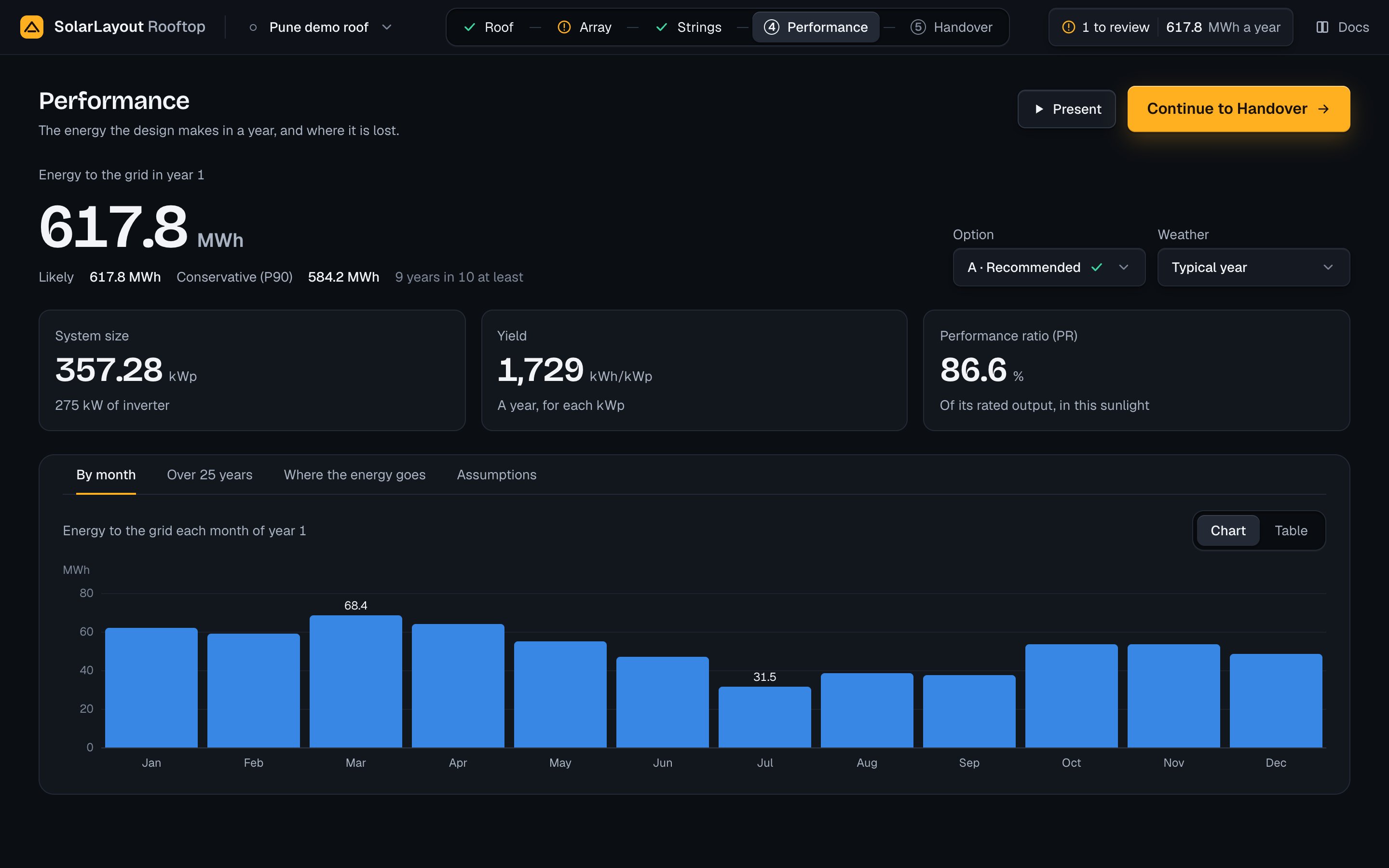
From the top, the page holds its head (Performance, with Present on a tablet and a desktop, and Continue to Handover), the energy of year 1 with the Option and Weather selects beside it, three figures, and four tabs: By month, Over 25 years, Where the energy goes and Assumptions. One tab shows at a time; the one opened last is remembered on this device. The arrow keys, Home and End move between the tabs.
How a run starts
There is no Run button. After each committed edit the app runs the design again, 500 ms after the last edit: edits closer together make one run, and a run already on its way is given up for the later one. When the roof, the array or the module changes, the app lays the modules out again first. A design opened a moment ago (the demo, a design from this device, a project file or a roof you built) runs at once.
| You do | What follows |
|---|---|
| Change the roof, the array, the equipment or the system voltage | The modules are laid out again where needed, then the design runs |
| Change a loss, an assumption, the roof albedo or the weather on this page | The design runs again; the roof is not laid out again |
| Change the ageing, the uncertainty, the levels or the grid CO₂ factor | The design runs again, and the year is not simulated again: these change only the figures worked out from the year |
| Choose another option | Shown at once: the last run holds each option's figures |
| Rename the design | Nothing runs |
A run needs weather for the site. When the design has none for its site and its source, the app loads it and then runs.
While a run is on its way, "Updating" and a turning ring stand beside the label of the energy. The figures, the charts and the bars of the last result stay on screen, dimmed, until the run lands. At the first load, before any result, grey blocks stand in their places.
⌘ Z or Ctrl Z undoes the last committed edit; ⌘ ⇧ Z, Ctrl ⇧ Z or Ctrl Y redoes it. A key pressed in a field belongs to the field.
The result chip
The result chip at the right of the top bar carries the same energy of year 1. Its states:
| The chip shows | When |
|---|---|
| A ring and "Computing the energy" | Before the first result |
| The figure, e.g. "586.4 MWh a year" | The result of the chosen option |
| The figure dimmed, with a ring | A run is on its way |
| The note mark and "<n> to review" before the figure | Notes wait in the notes to review |
| The note mark and "Energy not computed" | A run failed with no result before it, or no option can be made |
| The note mark, the last figure dimmed, "Showing the last result" | A later run failed; the result shown is from before the change |
Press the chip for The result: the energy in year 1, the modules used of the positions, the DC capacity, the AC capacity, the DC/AC ratio, the performance ratio (PR) and the yield, with Open Performance. Where a run failed, the panel puts the problem first, with Try again where trying again can help.
The energy of year 1
Energy to the grid in year 1 is the chosen option's energy delivered to the grid in its first year, in MWh with one decimal. Under it stand two figures with their chances:
- Likely: the P50, the energy that half of all years reach. It is the year-1 figure itself.
- Conservative (P90): the energy that 9 years in 10 reach at least, with those words beside it.
Conservative takes the highest level above P50 that the design asks for, set in Assumptions under Uncertainty. At P75 its words are "3 years in 4 at least"; at P95, "19 years in 20 at least". With no level above P50, there is no Conservative figure. The levels in between appear in the summary row Energy, year 1 under All 21 steps.
For the demo, the energy of year 1 is 586.4 MWh, Likely 586.4 MWh and Conservative (P90) 554.5 MWh.
Option and weather
The two selects stand at the right of the energy on a desktop, and under it, side by side, on a tablet or a phone.
Option
Option chooses which of the run's options the page shows: ways to wire the modules to the inverter, the best first. Each item reads "<letter> · <caption>" with its mark. How the options are made is on the Strings page, under Options.
Its caption says why it is there: "Recommended" (option A, when its DC/AC ratio is within the target), "Fills the inverter" or "Fills the inverters", "Less clipping", "Below target" or "Above target" (with ", <n> inverters" when the option has more than one), or "Your own option", the stringing you added in the Strings step. Some options have no caption.
A tick marks an option in the DC/AC target. A note mark says "Below the DC/AC target" or "Above the DC/AC target", or, for an option in the target, "MPPT current over its limit, or the limit not known". Choosing an option shows its figures at once and runs nothing again; undo takes the choice back. On a phone the select shows the option's letter alone. Before any option exists, the select is not shown.
Weather
Weather sets the year of weather the run uses. The default is Typical year.
| Choice | What it is |
|---|---|
| Typical year | From PVGIS, with the site's horizon: a typical meteorological year, hourly, with the horizon profile PVGIS gives for the site |
| 2023, measured | From NASA POWER, without a horizon: hourly values of 2023 for the site |
| Your file | A CSV of a year of weather you load (below) |
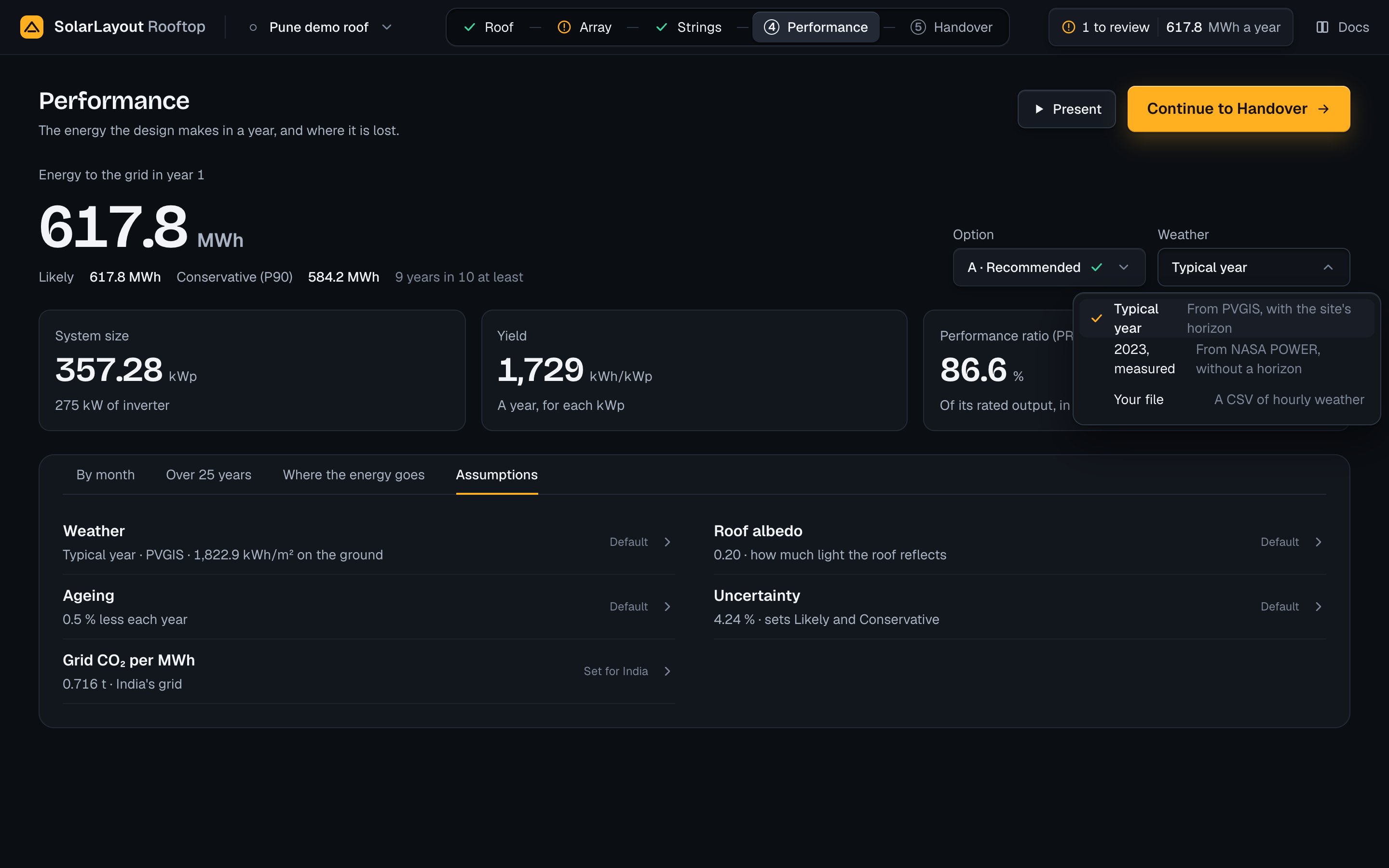
Choosing Typical year or 2023, measured names the choice in the select at once, with a turning ring in place of its chevron. Under the title a row says "Loading the typical year from PVGIS" or "Loading 2023's weather from NASA POWER", and "Updating" stands beside the energy. The weather is asked for the roof's latitude and longitude. When the hours arrive, the source and its hours become one edit, which undo takes back, and the run follows. While a weather loads the select cannot be opened; leaving the page gives the load up.
What each source brings:
| Source | Values, each hour | Notes |
|---|---|---|
| PVGIS | Global horizontal, beam normal and diffuse horizontal irradiance, air temperature at 2 m, wind speed at 10 m; the months placed on one calendar year | The horizon comes with it. If PVGIS gives no horizon, the weather loads without one and the run's note says "The weather for this site came without a horizon. The run leaves horizon shading out." |
| NASA POWER | The same five quantities for 2023 | Missing values are filled from the hours either side; irradiance below zero is taken as 0. No horizon |
Each source becomes one table of hours in UTC, each value the hour's average, with the sun placed at the middle of the hour. The horizon the run counts is shown in the Sun view's card under Shade over the year.
The weather is kept in the design with its hours, so a design opened again needs no load while its source is the same and the roof stands within 0.001° of latitude and longitude of where the weather was loaded. Move the roof further and the app loads the weather again.
Your file
Load weather of your own, from a measurement or another source, as a CSV.
Choose Your file
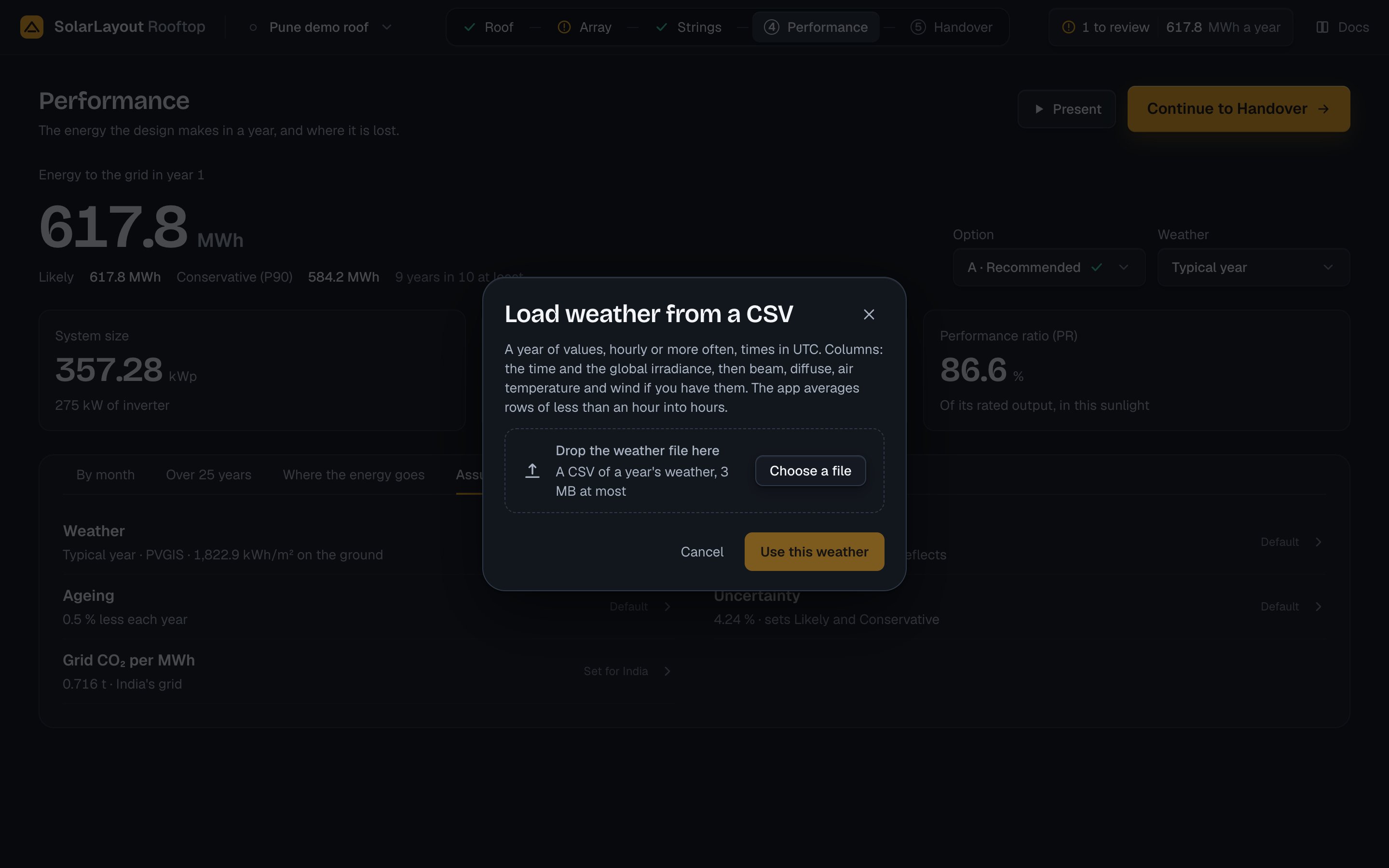
In Weather, choose Your file. The dialog Load weather from a CSV opens. Nothing changes until you use the weather.
Drop the file or choose it
Drop the file on Drop the weather file here, or press Choose a file. The app reads it and shows its name and three lines: the hours and the irradiation on the ground, the beam and diffuse irradiation, and the range of air temperature. Its notes stand under them.
Use the weather
Press Use this weather. The source, the file's name and text and its hours become one edit, and the run follows. Choose another picks a different file first.
What the file must be:
| Item | Requirement |
|---|---|
| File | .csv or .txt, at most 3 MB; the separator is detected; lines beginning with # and blank lines are left out |
| Length | One year: 8,760 hours, or 8,784 in a leap year, once rows of less than an hour are averaged |
| Time step | Hourly or finer. Rows less than an hour apart are averaged into the hour they begin in, with a note |
| Times | Written as YYYYMMDD:HHMM or any common date and time. A time without an offset is taken as UTC; a time with one, e.g. 2019-01-01 00:00+05:30, keeps it. A row's time is the start of its period |
| Units | Irradiance in W/m², air temperature in °C, wind speed in m/s |
The columns, by their header (trimmed, in any case; for each quantity the first name of its list that the file has is taken):
| Quantity | Header names read | Needed |
|---|---|---|
| Time | time, time(utc), datetime, date, timestamp, date/time | Yes |
| Global horizontal irradiance | ghi, g(h), gh, global_horizontal, allsky_sfc_sw_dwn, irradiance | Yes |
| Beam normal irradiance | dni, gb(n), bn, allsky_sfc_sw_dni | No |
| Diffuse horizontal irradiance | dhi, gd(h), dh, diffuse, allsky_sfc_sw_diff | No |
| Air temperature | temp_air, t2m, temp, temperature, tamb, t_amb, ambient_temp | No |
| Wind speed | wind_speed, ws10m, wind, ws | No |
What the app does with what is missing:
| The file | The app |
|---|---|
| Has no beam or no diffuse column | Works both out from the global irradiance with the Erbs model, the sun at mid-hour for the roof's place, with a note |
| Has no air temperature | Takes 25 °C for all hours and sizes the strings for 25 °C, with a note |
| Has no wind speed | Takes 1 m/s for all hours, with a note |
| Has air temperature missing in some rows | Fills them from the hours either side, with a note |
| Has irradiance below zero | Takes it as 0, with a note |
| Has a blank or unreadable global irradiance | Refuses the file: "Fill the gaps in the irradiance column." |
| Has blanks in beam or diffuse, both given | Refuses it: "Fill the gaps, or leave out both beam and diffuse." |
| Has a gap left in another column | Refuses it: "Fill the gaps, or leave the column out." |
| Has a time it cannot read | Refuses it: "Write it as 2023-06-01 13:00, in UTC." |
| Has an hour twice | Refuses it: "Keep each hour once." |
| Is not a whole year | Refuses it: "Give a whole year." |
| Is over 3 MB | Refuses it before sending: "Choose a file of one year." |
A refused file stays in the dialog with its name and size, under This file cannot be used and the reason. If the server cannot be reached, the dialog says The file was not loaded with the cause. Either way the weather of before stays.
A file without air temperature sizes the strings for 25 °C. In the Strings step, enter the site's lowest and highest ambient under Sizing temperatures (see Modules per string).
The file is checked again at each run. Its notes become the run's weather notes: each is listed as "Weather · Performance" with Open Performance, counts in the result chip's "to review", and marks the Performance step as needing you.
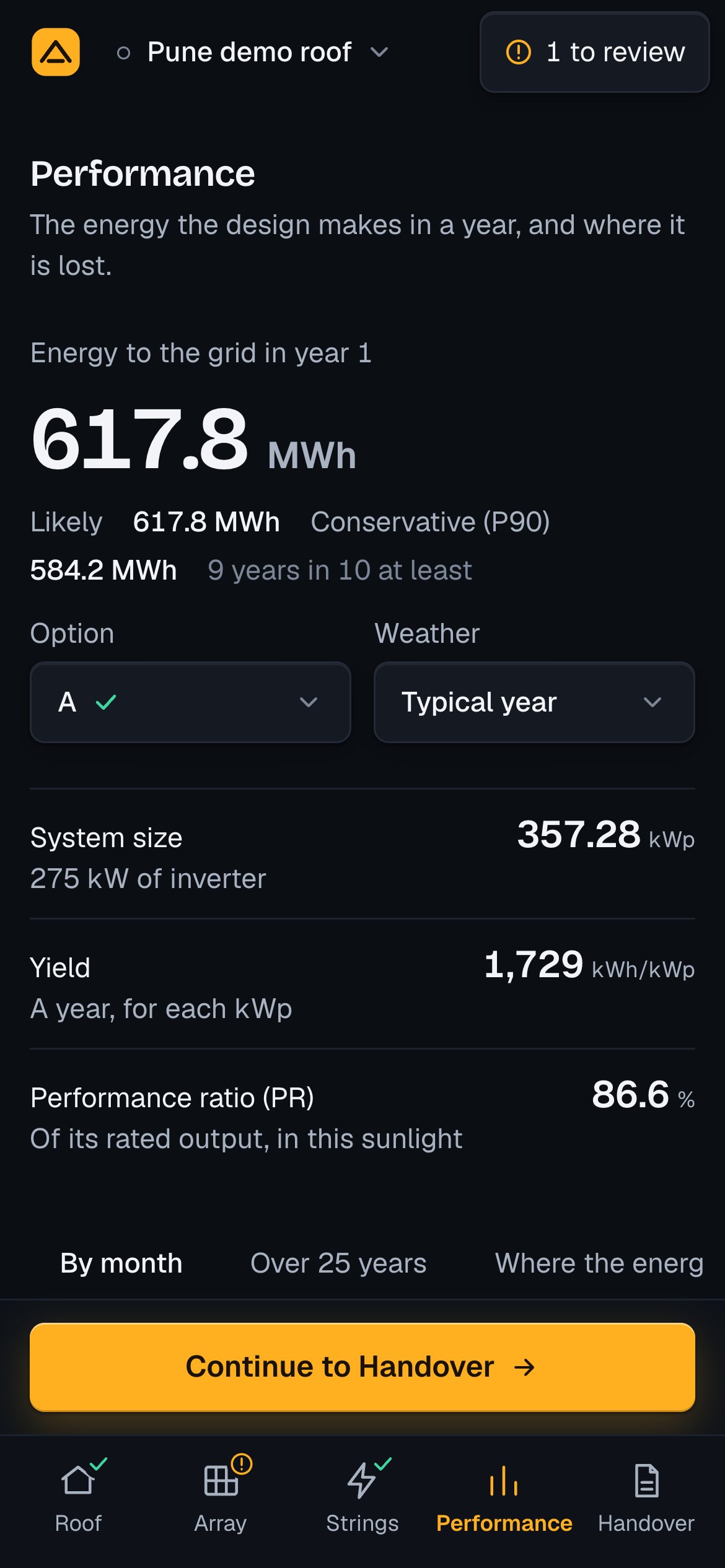
The three figures
| Figure | Shows | The words under it |
|---|---|---|
| System size | The DC capacity, kWp | "<x> kW of inverter", the AC capacity |
| Yield | The energy of year 1 per kWp, kWh/kWp | "A year, for each kWp" |
| Performance ratio (PR) | The energy to the grid against what the modules' rated power gives in the sunlight on them, % | "Of its rated output, in this sunlight" |
They stand as three tiles on a tablet and a desktop. On a phone they are a list, each label at the left and its figure at the right; the selects stand side by side under the energy, and Continue to Handover is pinned over the tab bar.
By month
"Energy to the grid each month of year 1": each month's sum of the year's hourly energy to the grid. Chart and Table at its right switch the view.
The chart has twelve bars from zero, with only the highest and the lowest month labelled. Point at a bar, focus it or tap it for its energy and yield, "<MWh> MWh · <kWh/kWp> kWh/kWp"; Escape or a second tap closes it. A month's yield is its energy in kWh over the DC capacity in kWp.
The table lists Month, Energy, MWh and Yield, kWh/kWp for each month, then a Year row.
Over 25 years
"Energy each year": one line over 25 years, with the total and the yearly fall under the title ("<total> MWh in all · <d> % less each year"). The axis fits the years rather than starting from zero, so the fall is visible; year 1 and year 25 carry their figures. Point at the line, or focus it and use the arrow keys, Home and End, for any year's energy. Table lists years 1, 5, 10, 15, 20 and 25, then "Total, 25 years".
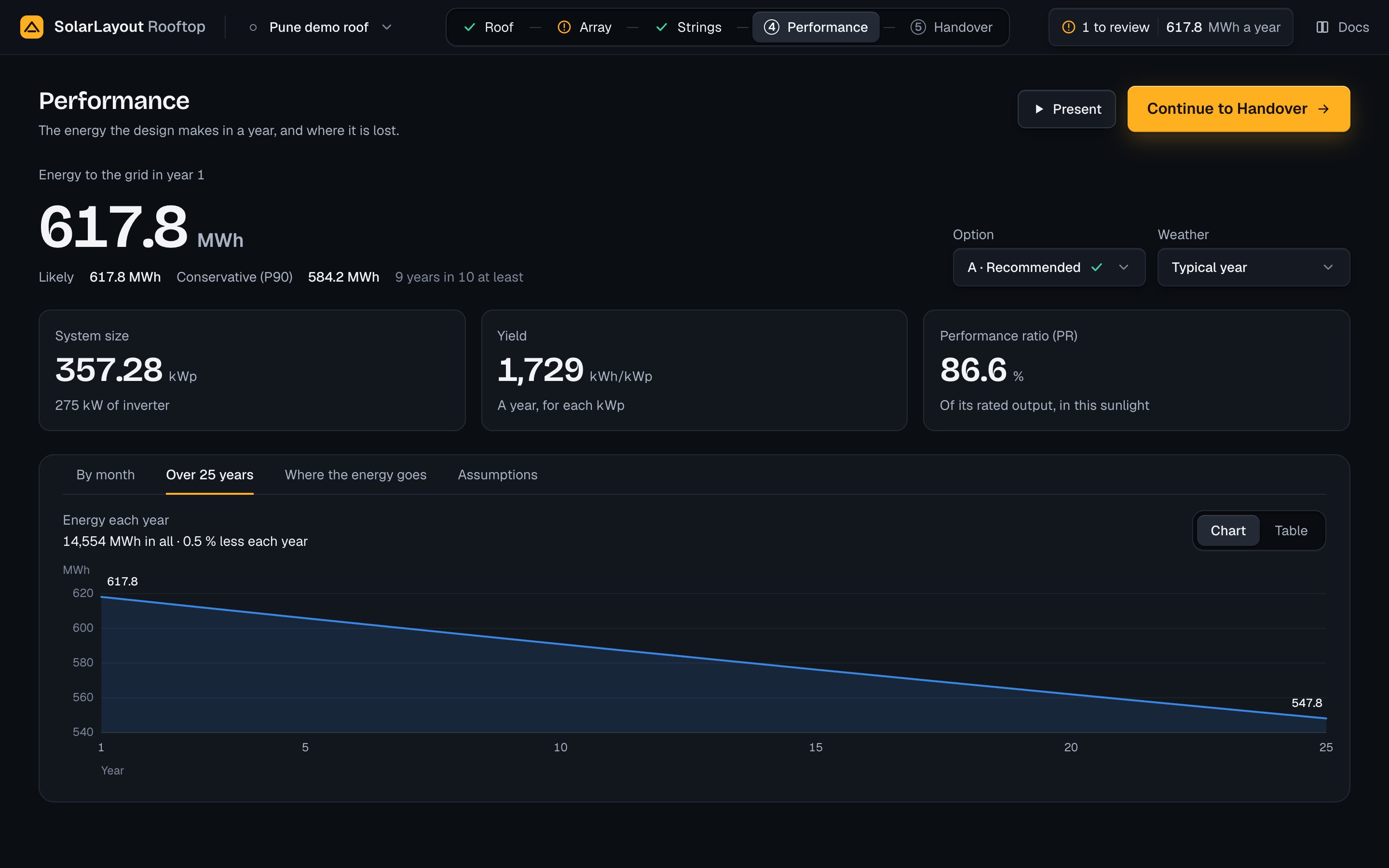
Year n's energy is year 1's × (1 − d)^(n − 1), where d is Less each year under Assumptions › Ageing (default 0.50 %). Year 1 is the simulated year, which already holds the light-induced degradation (LID) of the modules, so the yearly fall begins in year 2. The total is the sum of the 25 years.
Where the energy goes
The run's 21 steps from the sunlight to the grid, said as eleven plain steps. On a desktop they stand in two columns, Before the modules and In the system; on touch, in one. Each step has its name, its change ("+9.60 %", "−2.81 %"; "0.00 %" under 0.005 %) and a bar where a change of 10 % fills the bar, in the colour of a gain or a loss. Rest the pointer on a step for the rows of All 21 steps it holds. Each step's change is its rows' changes compounded, so the eleven compound to the same total as the 21.
| Step | Group | Rows of All 21 steps it holds |
|---|---|---|
| Sunlight on the tilted modules | Before the modules | Transposition to plane |
| Shade from rows, obstacles and the horizon | Before the modules | Far shading, horizon · Near shading, linear |
| Dirt on the glass (soiling) | Before the modules | Soiling |
| Light reflected off the glass | Before the modules | IAM |
| Light on the back of the modules | Before the modules | Bifacial rear gain |
| The modules' rated output | Total, MWh | Array nominal energy at STC |
| Heat | In the system | Temperature |
| Low light and module quality | In the system | Irradiance level · Module quality · LID · Mismatch |
| Shade on a string | In the system | Electrical shading |
| Cables | In the system | DC ohmic · AC ohmic |
| Inverter | In the system | Inverter efficiency · Inverter clipping · Night consumption |
| Downtime | In the system | Availability |
| To the grid | Total, MWh | Energy to grid |
Three steps carry a field, with "Default" or "Yours" beside it:
| Field | Default | Range | What it does |
|---|---|---|---|
| Soiling (Dirt on the glass) | 2.00 % | 0–30 % | The front irradiance × (1 − soiling); the rear is not soiled |
| Mismatch between modules (Low light and module quality) | 1.00 % | 0–10 % | DC power × (1 − mismatch) |
| Downtime (Downtime) | 0.50 % | 0–20 % | Kept as availability, 100 % less the downtime; the energy to the grid × availability |
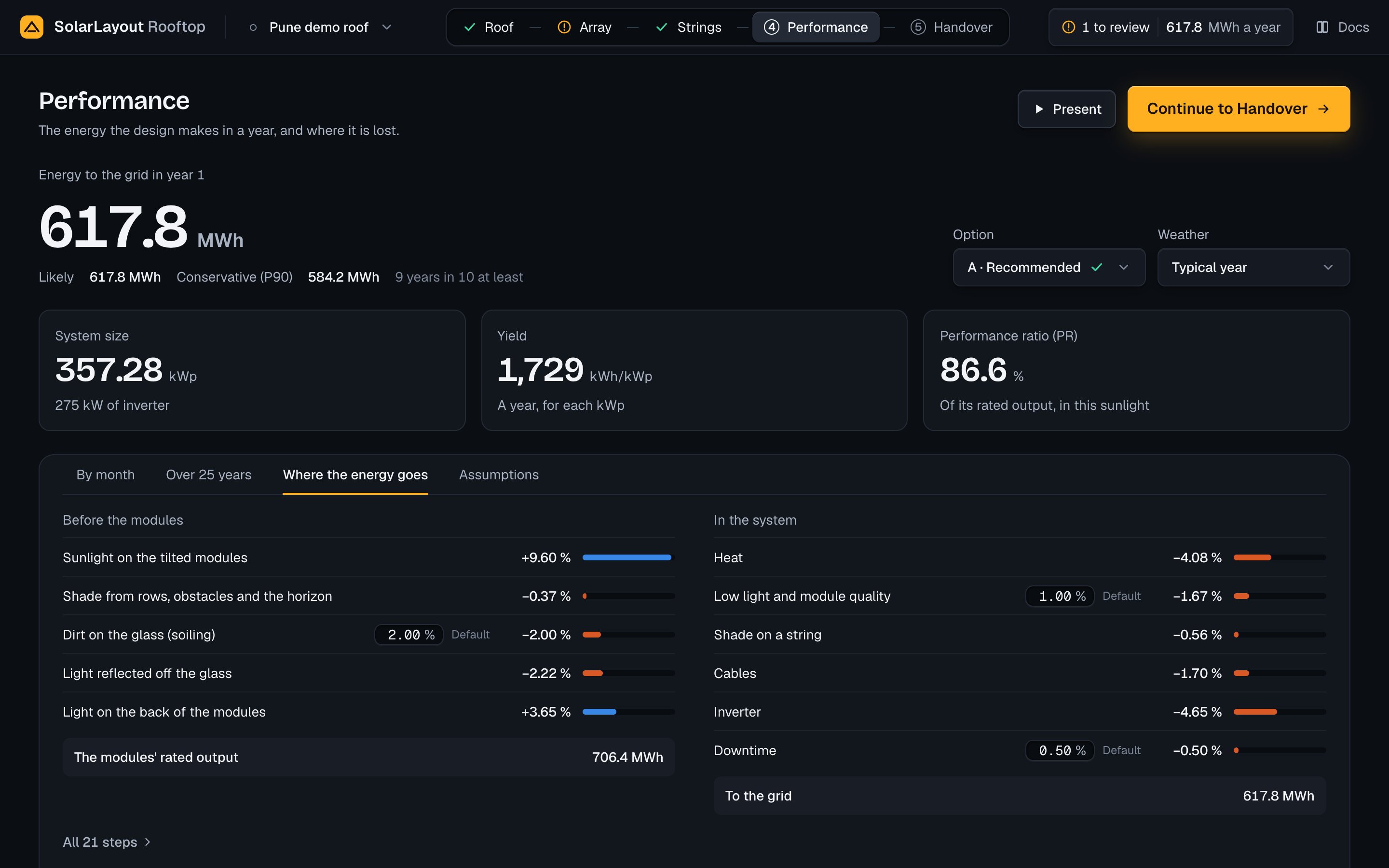
All 21 steps
All 21 steps, under the columns, opens the full chain in their place, "All 21 steps, as the report lists them", with the legend Gain, Loss and Editable. 11 steps goes back, and so does opening another tab. Each row has its label, its field where you may change it, its change against the row before, a bar on a cascade from the running total before to the one after, and the running total. The three totals, the global horizontal irradiation, the array's nominal energy and the energy to the grid, carry their units, kWh/m² or MWh. Rest the pointer on a row for 400 ms, focus its field or tap it for "<total> <unit> · <change>"; Escape closes it.
| Field | Default | Range | What it does |
|---|---|---|---|
| Soiling | 2.0 % | 0–30 % | The same value as the eleven steps' Soiling |
| Bifacial rear gain (switch) | On | On or off | Adds the rear irradiance × the module's bifaciality × (1 − the rear loss) |
| Rear shading and mismatch | 10.0 % | 0–50 % | The rear's loss to the structure's shade and to mismatch |
| Heat loss factor (Uc) | By roof type: 29 for Tilted rows, 20 for East-west, 15 for Sloped, W/m²K | 5–60 W/m²K | The constant loss factor of the cell temperature model |
| Module quality | 0.0 % | −5 to 10 % | DC power × (1 − quality); a negative value is a gain |
| LID | The module file's value, else 1.5 % | 0–10 % | DC power × (1 − LID), in each year |
| Mismatch | 1.0 % | 0–10 % | The same value as the eleven steps' Mismatch between modules |
| DC ohmic | 1.5 % at STC power | 0–10 % | The share lost scales with the string's power over its STC power, at most twice the value |
| AC ohmic | 1.0 % at nominal AC power | 0–10 % | Scales with the inverters' load, at most twice the value |
| Availability | 99.5 % | 80–100 % | The energy to the grid × availability; the eleven steps' Downtime is 100 % less it |
The rear-gain switch cannot be used with a module that is not bifacial ("The module is not bifacial: no rear gain.") or on a Sloped roof, where the modules lie flush ("Flush modules lie on the roof: no rear gain."). The Heat loss factor and LID show the value they take from the roof type or the module file inside the field until you type one. Typed, the row offers the way back: "Roof type gives <x> W/m²K" with Use the roof type's, or "Module file gives <x> %" with Use the module file's (or Use the default). A value out of range is brought to the nearest end, "The highest is <max> <unit>." or "The lowest is <min> <unit>."; a value that is not a number gets "Enter a number from <min> to <max> <unit>." The other rows come from the weather, the layout and the equipment files, and have no field.
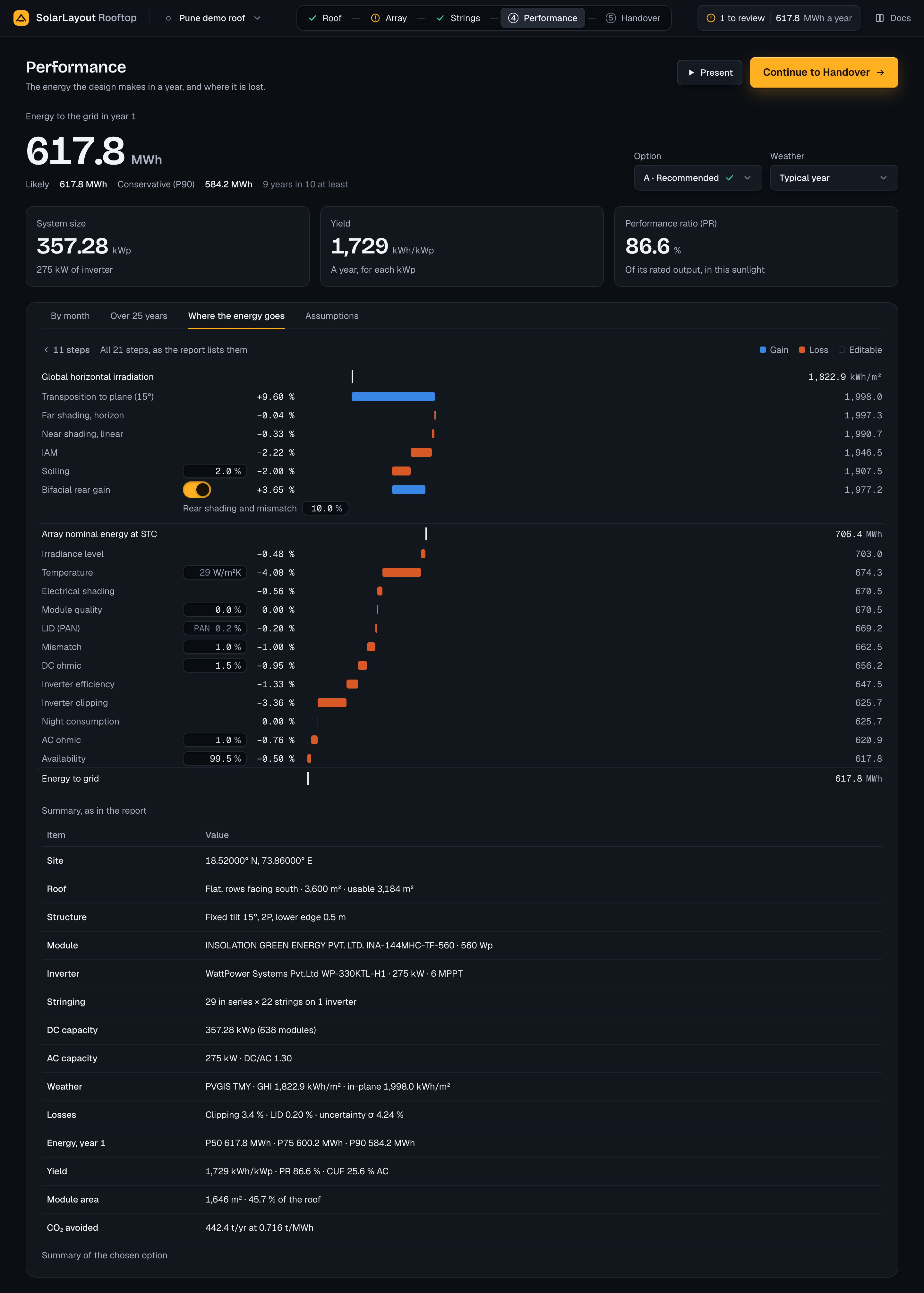
Under the chain, "Summary, as in the report" lists the chosen option in one table: the rows of the design report's first page, with a Losses row added:
| Row | What it gives |
|---|---|
| Site | Latitude and longitude |
| Roof | The roof type's long name, the roof's area and its usable area |
| Structure | The mounting: tilt, modules in a row's height, lower edge; or the east-west tilt and ridge gap; or the roof pitch of flush rails |
| Module, Inverter | Maker, model and rating; the inverter's MPPT count |
| Stringing | Modules in series, strings and inverters |
| DC capacity, AC capacity | kWp with the module count; kW with the DC/AC ratio |
| Weather | The weather's name, the global horizontal and the in-plane irradiation, kWh/m² |
| Losses | Clipping, LID and the uncertainty σ |
| Energy, year 1 | Each level the design asks for, P50, P75 and P90 by default, MWh |
| Yield | kWh/kWp, the PR and the capacity utilisation factor (CUF) on AC |
| Module area | m² and the share of the roof |
| CO₂ avoided | t a year at the grid factor |
Assumptions
Five rows, each with its facts on one line and who set it at the right; a press opens its fields in place. On a desktop they read in two columns, Weather, Ageing and Grid CO₂ per MWh at the left, Roof albedo and Uncertainty at the right; on touch, one column. Which rows are open is remembered on this device. The rows stand even before any option exists.
| Row | Its line | Who set it |
|---|---|---|
| Weather | The weather's name, its source and the irradiation on the ground | "Default" for Typical year, else "Yours" |
| Roof albedo | "<x> · how much light the roof reflects" | Default or Yours |
| Ageing | "<d> % less each year" | Default or Yours |
| Uncertainty | "<σ> % · sets Likely and Conservative" | Default while σ and the levels are the defaults |
| Grid CO₂ per MWh | "<f> t · India's grid" | "Set for India" while the default holds, else Yours |
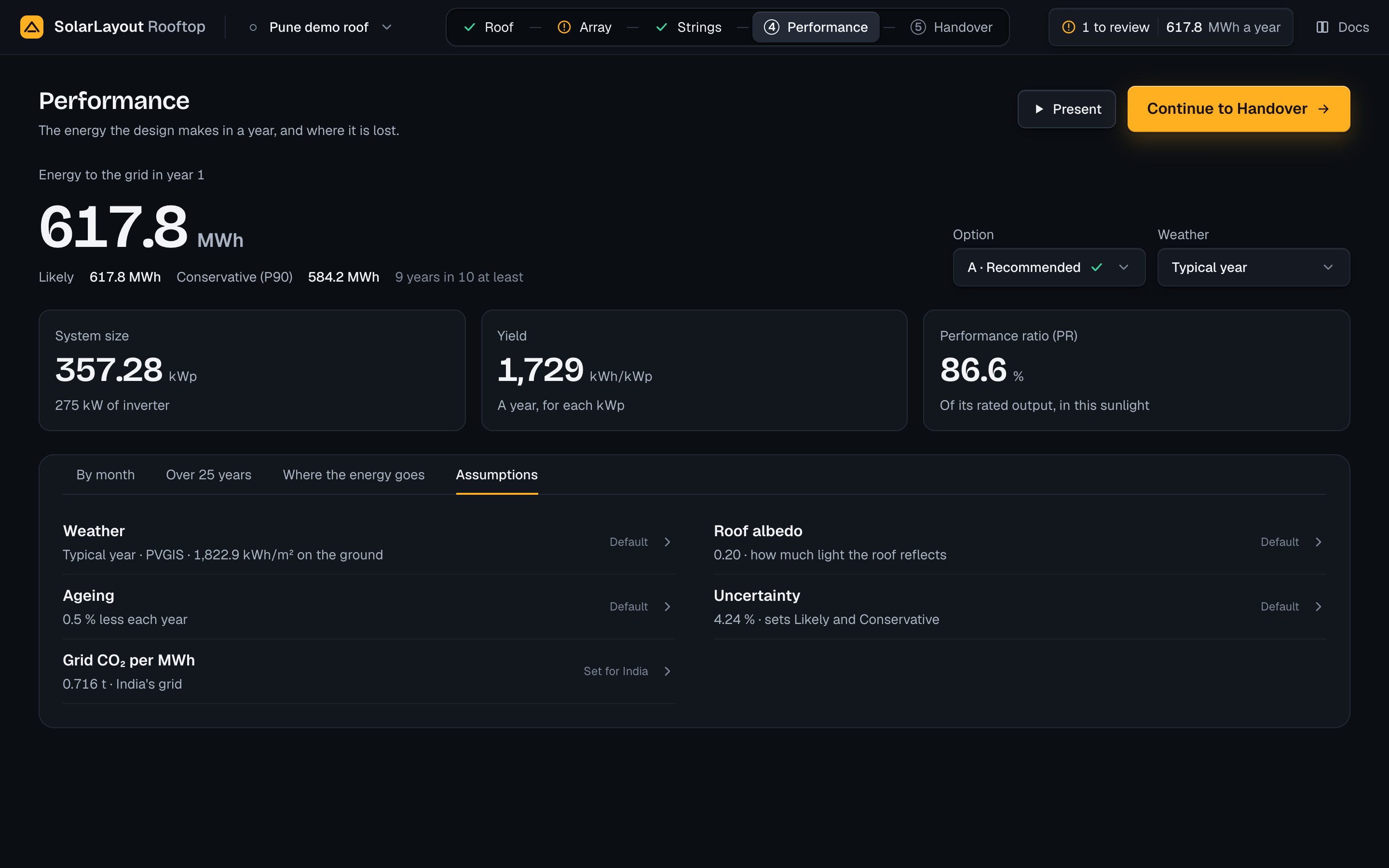
Opened, Weather gives the hours, the range of air temperature and the horizon's highest point (or "no horizon"), the run's weather notes, and "At the top of the page, choose the weather beside the energy."
| Field | Default | Range | What it does |
|---|---|---|---|
| Roof albedo (Roof albedo) | 0.20 | 0.05–0.9 | How much light the roof reflects: the ground-reflected light in the transposition and on the modules' back |
| Less each year (Ageing) | 0.50 % | 0–3 % | The yearly fall of Over 25 years |
| Weather variability (Uncertainty) | 3.0 % | 0–20 % | σ of the weather year |
| Model and data (Uncertainty) | 3.0 % | 0–20 % | σ of the model and its inputs |
| Likely and conservative levels (Uncertainty) | P50 · P75 · P90 | Three fields, P50 to P99 | The levels computed; the highest above P50 is Conservative. Sorted when committed; a level given twice is kept once |
| Grid CO₂ (Grid CO₂ per MWh) | 0.716 t/MWh, India's grid (CEA) | 0–2 t/MWh | CO₂ avoided = the energy × the factor |
Under each field the hint says "Default", "Yours · default <x>" or "Set for India". Roof albedo is set here alone: the Roof step shows its value with a line to Performance, under Edges and access.
The model
The run computes each hour of the weather in PVsyst's order of losses. The parts below lead to the rows of All 21 steps and the figures of the page.
| Part | How the run computes it |
|---|---|
| Sun position | The NREL solar position algorithm at the middle of each hour: apparent zenith and elevation |
| Transposition to plane | The Perez model (the all-sites composite 1990 coefficients), with the extraterrestrial beam, the Kasten–Young air mass and the roof albedo; once for each tilt and azimuth (an east-west roof has two) |
| Horizon shading | Beam set to zero in hours when the sun is above 0° but below the horizon line; the share of isotropic diffuse the horizon hides (sin² of its height, averaged over 36 sectors) is booked in this row too |
| Near shading | Row-to-row shading worked out from the profile angle; obstacle and parapet shadows projected at each module's mid-height, the sun's positions grouped in bins of 1° of elevation by 2.5° of azimuth; the linear loss 1 − (1 − row share)(1 − obstacle share); the diffuse each module sees reduced by the obstacles (36 sectors) and, for a module with a row in front, by Passias masking. A string takes its modules' mean |
| Incidence angle (IAM) | The module file's IAM profile (3 points or more, interpolated), else ASHRAE with b0 = 0.05; the sky and ground diffuse at the equivalent angles 59.7 − 0.1388β + 0.001497β² and 90 − 0.5788β + 0.002693β² |
| Soiling | The front irradiance × (1 − soiling) |
| Bifacial rear gain | The infinite-sheds model, isotropic, the rear irradiance at the ground coverage ratio, the row spacing and the module's mid-height, × the module file's bifaciality × (1 − the rear loss). Only with the switch on, a bifacial module and a roof that is not Sloped |
| Array nominal energy at STC | The sum of the effective irradiance / 1000 × each string's rated power |
| Module | The PVsyst one-diode model, its photocurrent and saturation current fitted to the module file's Isc and Voc at STC with its Rs, Rsh, Rsh(0), Rsh exponent, Gamma and μGamma, band gap 1.121 eV; the maximum power point by Newton's method; zero power under 1 W/m². A string works at its modules' mean irradiance and cell temperature. Irradiance level is the one-diode power at 25 °C against the rated power |
| Cell temperature | The PVsyst cell temperature model with Uc (by roof type, or yours), Uv = 0 and the module's efficiency; absorption 0.9 |
| String shading loss | A shaded share under 1 % is left out; in portrait a whole module, or half of a half-cell module; in landscape one bypass substring for each share; never less than the linear loss. A string runs at its weakest module: its worst module's loss less its mean linear loss, applied to the beam's share of its irradiance. See how shading is worked out |
| Module quality, LID, mismatch, DC ohmic | Applied in that order; the DC ohmic loss scales with the load |
| Inverter | For each inverter, the efficiency curves of the inverter file (OND) by input power, interpolated between curves by the power-weighted string voltage; without curves its European efficiency, else 97 %; zero below its threshold power; clipped at its nominal AC power; its night consumption in hours with no DC input |
| AC ohmic, availability | As their fields say |
| Performance ratio | The energy × 1000 / (kWp × the in-plane irradiation), the in-plane value taken after the transposition and before shading, IAM, soiling and rear gain |
| Yield | The energy × 1000 / kWp |
| Likely and Conservative | The energy at level x is E × (1 − z × σ), where z is the normal quantile of x / 100 and σ = √(weather variability² + model and data²). At the defaults σ is 4.24 %, and P50 equals E |
| Over 25 years | Year n = E × (1 − d)^(n − 1), n from 1 to 25 |
| CO₂ avoided | The energy × the grid factor, t a year |
| Clipping (summary) | 1 − the clipped output / the inverter's output |
The 21 rows of All 21 steps, in order:
| # | Row | In the eleven steps |
|---|---|---|
| 1 | Global horizontal irradiation | The start, kWh/m² |
| 2 | Transposition to plane (<tilt>°) | Sunlight on the tilted modules |
| 3 | Far shading, horizon | Shade from rows, obstacles and the horizon |
| 4 | Near shading, linear | Shade from rows, obstacles and the horizon |
| 5 | IAM | Light reflected off the glass |
| 6 | Soiling | Dirt on the glass (soiling) |
| 7 | Bifacial rear gain | Light on the back of the modules |
| 8 | Array nominal energy at STC | The modules' rated output, MWh |
| 9 | Irradiance level | Low light and module quality |
| 10 | Temperature | Heat |
| 11 | Electrical shading | Shade on a string |
| 12 | Module quality | Low light and module quality |
| 13 | LID | Low light and module quality |
| 14 | Mismatch | Low light and module quality |
| 15 | DC ohmic | Cables |
| 16 | Inverter efficiency | Inverter |
| 17 | Inverter clipping | Inverter |
| 18 | Night consumption | Inverter |
| 19 | AC ohmic | Cables |
| 20 | Availability | Downtime |
| 21 | Energy to grid | To the grid, MWh |
Options are made and simulated as the Strings step describes: each candidate is simulated over the whole year, those in the DC/AC target come first, then the most energy, and five at most are kept. Your own option, when it can be built, is simulated after them and takes the next letter.
When something goes wrong
Before any option exists, the page shows the energy's label, the Weather select and a card with the reason and a button to the step that puts it right, then Assumptions:
| Card | Button |
|---|---|
| "No module fits on this roof" | Open Roof |
| "Choose a system voltage to size the strings" | Open Strings |
| "No string length fits at <V> V" | Open Strings |
| "Too few positions for a string" | Open Strings |
A run that fails puts a note under the title: "Energy not updated" with "Showing the last result" and Try again, the values of before staying on screen; or, with no result before, "Energy not computed" with "There is no result yet" and Try again. The reason stands under it, such as "The server could not be reached. Check your connection, then try again." or "The server did not answer. Try again in a moment." Try again runs at once.
A weather that does not load leaves Weather not loaded and the reason under the selects; the weather of before stays. Check the site, try again, or choose another source. A CSV that is refused says why in its dialog (above).
More cases are on the troubleshooting page.
Strings
The options for wiring the modules and the proof that each fits, your own option, the inverter, the system voltage, the MPPT loading and when no length fits.
Handover
The design's files for the client, the utility and the installer, what each one holds and how it is made, and the project file that carries the design.