The Word report
The Detailed Project Report (.docx) — its title page and eight sections, quoted exactly as the document prints them.
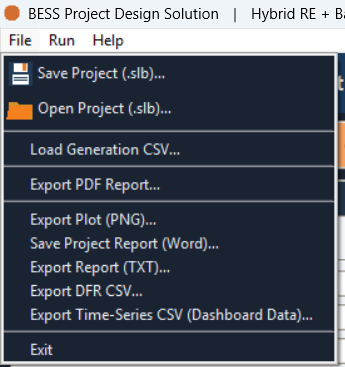
Save Project Report (Word)… writes the run as a Detailed Project
Report (DPR) — a .docx file laid out in eight sections, in a fixed order,
for handing to someone who was not at the keyboard for the run itself.
Two ways to export
| Where | Label |
|---|---|
| File menu | Save Project Report (Word)… |
| Summary tab toolbar | 📄 Save Report |
The save dialog is titled Save Project Report (Word).
Both buttons need this device activated — the same requirement as ▶ Simulate, ⚙ Optimise, and every other report or data export covered in this section. See How access works.
The title page
Before the numbered sections, an unnumbered title page carries the logo, the report's title and subtitle, the line Detailed Project Report (DPR), the date the document was generated, and the line Prepared with SolarLayout — BESS Project Design Solution.
The eight sections
The document is assembled in this order. The Heading column is the exact text printed in the document.
| Heading | What it holds |
|---|---|
| 1. Executive Summary | A narrative paragraph, then a headline table — Project IRR, Equity IRR, NPV, Total CAPEX, LCOE, LCOS, Simple Payback, MoIC — under a Financial Highlights sub-heading. See Return metrics for what each figure means. |
| 2. Project Configuration | Project type, Contracted Capacity, project life, peak hours, the Peak-hour and Off-Peak DFR targets, and the Peak-Shift/grid-backup flags. See Capacity and DFR targets and The peak window. |
| 3. Technical Parameters | Solar, Wind and BESS sizes, round-trip efficiency, depth of discharge, initial state of health, Battery EOL, C-rate, and BESS degradation. See Battery parameters. |
| 4. Financial Assumptions | CAPEX, tariff and export tariff, discount rate, debt percentage/rate/tenor, and the grid-charging price. See Financing and discounting. |
| 5. Financial Results & Cash-flow | A per-year table — Gross Revenue, OPEX, EBITDA, NCF, Equity CF, DSCR — plus Grid MWh and Grid %Exp columns on any year that drew grid charging. See The financials table. |
| 6. Dashboard & Charts | The Dashboard figure, embedded as an image, when a plot exists. See The dashboard. |
| 7. Analysis & Business Recommendation | Bulleted commentary — returns against the hurdle rate, LCOE/LCOS against tariff, a dispatch/degradation note, and an optional working-capital note — plus a bolded Recommendation: verdict. |
| Appendix A — Detailed Calculation Notes | The same plain-text report as the text export and the Summary tab, embedded in full. |
The section 7 verdict is based on whether the run's Project IRR meets the Project Target IRR field on the 📊 OPEX tab — see OPEX, revenue and penalties.