Peak and off-peak window
Marking which hours of the day are Peak, the Quick Preset shortcuts, and what an empty peak set does.
The ⏰ Peak tab splits the day into Peak and Off-Peak hours. The split decides how the battery is scheduled: on Peak hours it discharges first and any excess generation then charges it; on Off-Peak hours it charges first and the remainder of generation meets the contracted load.
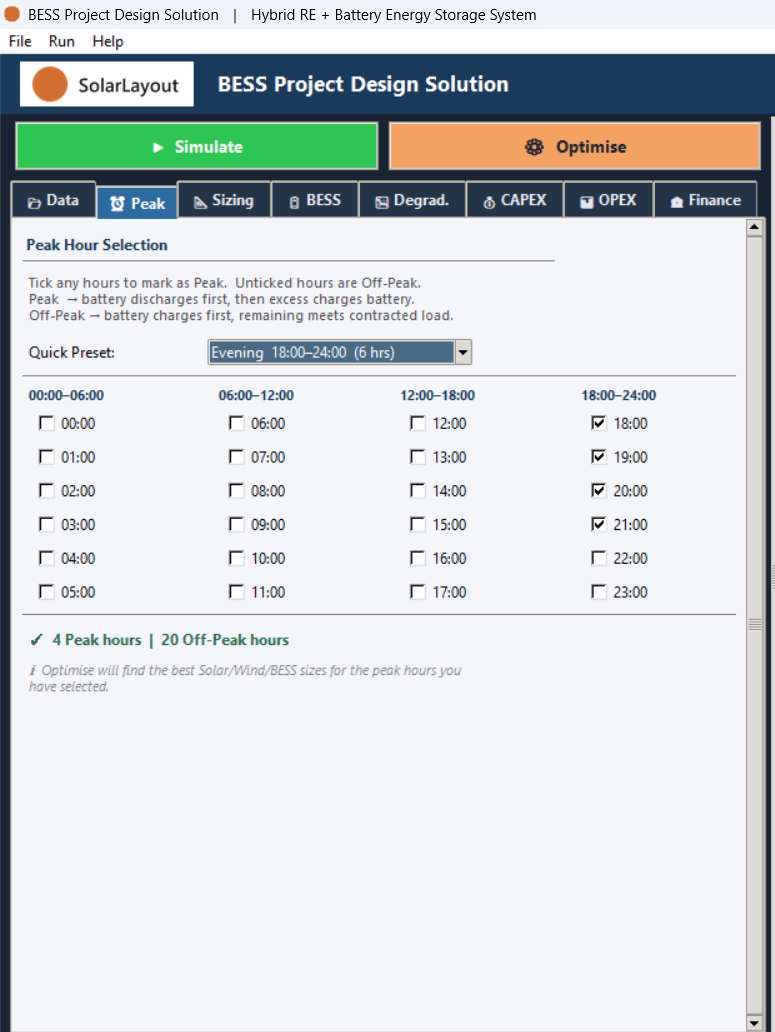
Fields
| Field | Default | Range | What it does |
|---|---|---|---|
| Quick Preset: | Evening 18:00–24:00 (6 hrs) shown, index 0 — see the callout below | Evening 18:00–24:00 (6 hrs), Morning 06:00–12:00 (6 hrs), Day 06:00–18:00 (12 hrs), Night 18:00–06:00 (12 hrs), All Hours (24 hrs), Custom | Fills the 24 hour checkboxes with a standard pattern once you pick an option from the dropdown |
| Hour checkboxes (24, one per hour) | 18:00, 19:00, 20:00, 21:00 ticked as Peak (4 hours); every other hour Off-Peak | Each hour ticked (Peak) or unticked (Off-Peak) | Sets which hours are Peak and which are Off-Peak; a live counter beneath the grid reflects the current tick state |
The Quick Preset: dropdown shows Evening 18:00–24:00 (6 hrs) pre-selected, but that preset is never actually applied on launch — it only takes effect once you pick an option from the dropdown yourself. The 4 hours actually ticked in the grid below are the real starting point.
Preset options
| Option (exact) | Hours applied |
|---|---|
| Evening 18:00–24:00 (6 hrs) | 18:00–23:00 |
| Morning 06:00–12:00 (6 hrs) | 06:00–11:00 |
| Day 06:00–18:00 (12 hrs) | 06:00–17:00 |
| Night 18:00–06:00 (12 hrs) | 18:00–23:00, 00:00–05:00 |
| All Hours (24 hrs) | 00:00–23:00 |
| Custom | No hours filled in automatically |
Peak versus Off-Peak
Peak hours make the battery a deficit-filler: it discharges first, and any generation left over after that then charges it. Off-Peak hours reverse the role: the battery charges first, and the remainder of generation meets the contracted load.
An empty peak set
Unticking every one of the 24 hours is read as an explicitly empty peak set, and switches the dispatch to CC-firming — firming the Contracted Capacity every hour of the day, rather than discharging only inside a window. The exception is a Standalone (non-cycle) BESS, which requires at least 1 peak hour and warns instead of accepting an empty set.