Optimise
Search Solar, Wind and BESS size for the highest IRR, and compare three scenarios before applying one.
⚙ Optimise doesn't run one fixed case — it searches for a Solar, Wind and BESS mix instead, and hands back three scenarios to choose between rather than a single result. For a single fixed configuration, see Simulate.
What it needs
The same as Simulate: a loaded generation data file unless the project type is 4. Standalone BESS (grid-charged), and this device activated — ⚙ Optimise is gated the same way as ▶ Simulate and every export. See Generation data and How access works.
Optimise also reads Project Target IRR, on the 📊 OPEX tab — see OPEX, revenue and penalties — and falls back to 15% if that field can't be parsed.
The size search
The search runs over three free variables: Solar MW, Wind MW and BESS MWh — the same fields set as a starting point in Initial sizing. Its bounds respect the project's topology: a source excluded by the project type is pinned to approximately 0 MW, so the search never adds it back in.
Three scenarios
| Scenario | What it searches for |
|---|---|
| Max IRR • Your Peak Hours | The Solar/Wind/BESS mix with the highest IRR, keeping the Peak hours you've set on the ⏰ Peak tab |
| Max IRR • Suggested Peak Hours | First finds the highest-scoring contiguous block of hours the same length as your own Peak-hour count, then searches for the highest-IRR mix on that block instead |
| Hits Target IRR (±0.5%) / Closest Achievable to Target | Searches Solar/Wind/BESS combinations for a mix whose project IRR lands within ±0.5 percentage points of Project Target IRR. Titled Hits Target IRR (±0.5%) when a mix reaches that tolerance, Closest Achievable to Target when none does |
Max IRR • Your Peak Hours is loaded into the main view — the 📈 Dashboard, 📋 DFR Table, 💹 Financials and 📝 Summary tabs — before the Scenario Comparison window opens.
The Scenario Comparison window
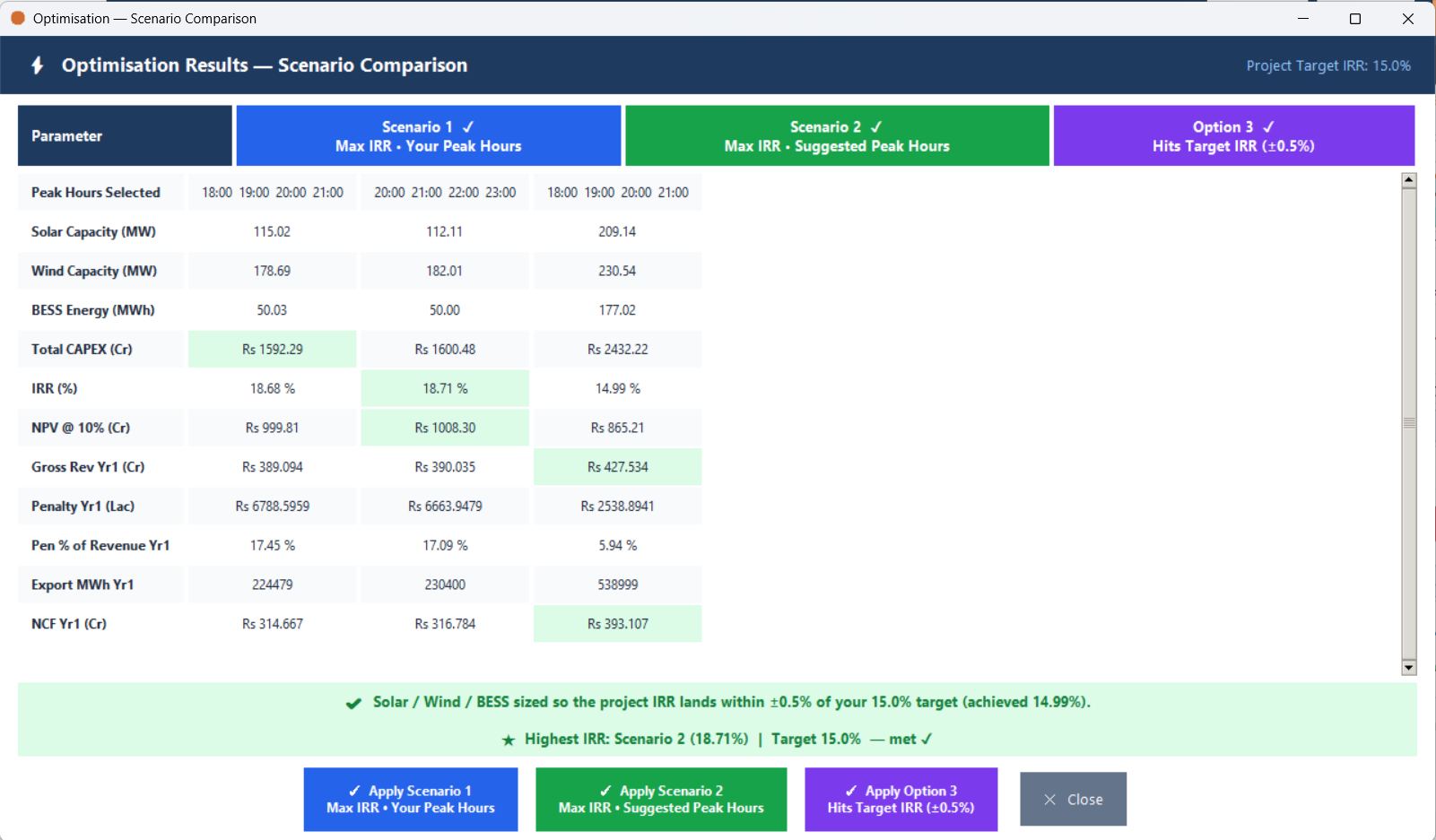
Once the search finishes, a window titled Optimisation — Scenario Comparison opens, with one column per scenario. Its rows, top to bottom: Peak Hours Selected, Solar Capacity (MW), Wind Capacity (MW), BESS Energy (MWh), Total CAPEX (Cr), IRR (%), NPV @ 10% (Cr), Gross Rev Yr1 (Cr), Penalty Yr1 (Lac), Pen % of Revenue Yr1, Export MWh Yr1, NCF Yr1 (Cr).
The column of whichever scenario has the highest IRR is shaded green if that IRR also meets the Target IRR, red if it doesn't. For each of the CAPEX, IRR, NPV, Gross Rev and NCF rows, the winning cell across the three scenarios is shaded light green. A banner along the bottom names the highest-IRR scenario and its IRR, states the Target IRR, and says whether it was met.
Each scenario's column carries a ✓ Apply <Scenario> button — applying that scenario's Peak hours, sizes and results to the main view and closing the window — alongside a single ✕ Close button.